
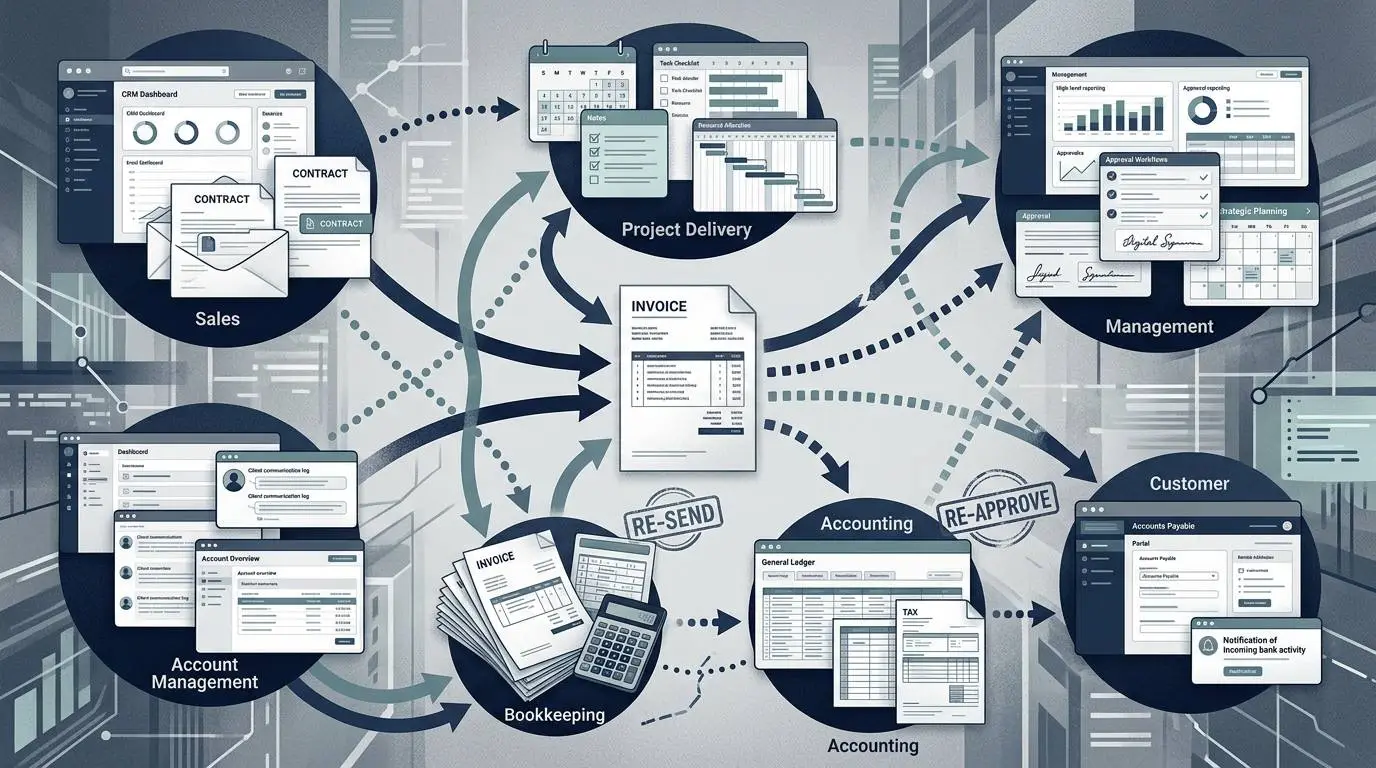
- A company can use accounting software and still have a manual AR workflow when people must reconstruct status through memory, email, spreadsheets, and repeated questions.
- One invoice may pass through seven informal owners, creating distributed knowledge without a clearly accountable next action.
- The hidden workload includes transaction, reconstruction, coordination, and recovery work—not only invoice creation and reminders.
- Automation works best after the team defines billing triggers, required information, delivery rules, stop conditions, exception ownership, and escalation authority.
- Trace ten recent invoices before buying software; searches, handoffs, corrections, and duplicated updates will reveal where time is being lost.
The client paid the invoice eleven days ago.
The owner does not know that.
The bookkeeper can see a deposit in the bank feed but cannot tell which invoice it belongs to. The customer emailed a payment reference to the project manager, who forwarded it to the accountant but not the bookkeeper. The accountant is closing last month’s records and assumes the internal team has already matched the payment.
Meanwhile, the aging report still shows the invoice as overdue.
On Tuesday morning, the owner sends the customer a polite reminder. The customer replies with proof of payment and copies the account manager, who apologizes. Three employees then spend part of the morning locating the payment, correcting the records, and explaining what happened.
No single task took very long.
Together, they created an avoidable customer-facing mistake and consumed time across four roles.
That is how manual accounts receivable work usually becomes expensive. The cost is not contained in one obvious administrative job. It is distributed across short interruptions, searches, clarifications, status updates, corrections, and duplicated decisions.
A Manual AR Process Is Not Simply a Process Without Software
A company can use accounting software and still operate a predominantly manual accounts receivable process.
For the broader system view—including what software can and cannot automate—see our accounts receivable automation guide.
The process remains manual when its true status depends on someone remembering, searching, copying, asking, or interpreting.
Common examples include:
- A project manager must remember to tell the bookkeeper that work is complete.
- A salesperson knows the negotiated payment term, but the accounting record shows the default term.
- A customer’s purchase-order requirement lives in an email thread.
- Reminder dates are maintained in a spreadsheet.
- A dispute is known to an account manager but still appears as an ordinary overdue invoice.
- A payment confirmation sits in one inbox while the receipt remains unapplied in accounting.
- The owner must ask several people before estimating what cash is likely to arrive.
The accounting platform may contain the invoice balance, but it does not contain the complete operational story.
That distinction matters. A manual workflow is not defined by whether the company has technology. It is defined by whether people must continually reconstruct the process around the technology.
AFP notes that manual data entry can produce errors, delays, and additional labor costs. It also recommends updated customer information, clear terms, consistent follow-up, performance monitoring, and separation of certain AR responsibilities.
One Invoice Can Pass Through Seven Informal Owners
In a small B2B company, accounts receivable is often described as the bookkeeper’s responsibility.
Operationally, that is rarely true.
| Participant | What this person may know | What this person may not know |
|---|---|---|
| Owner | Cash pressure, strategic relationships, escalation authority | Whether the latest reminder was sent or payment was received |
| Salesperson | Negotiated price, payment terms, customer expectations | Whether billing received the final agreement |
| Project manager | Work completion, change requests, client approval | Exact invoice status or collection history |
| Account manager | Relationship context and customer complaints | Whether the accounting balance is current |
| Bookkeeper | Invoice records, aging, routine payment activity | Scope history, undocumented promises, operational disputes |
| Accountant or controller | Financial reporting, reconciliation, controls | Day-to-day client conversations and project exceptions |
| Customer contact | Internal approval status and payment process | Which person at the supplier owns the issue |
Each person holds a valid piece of the process.
The problem is that no one necessarily owns the complete handoff.
The salesperson may believe the project manager will communicate the payment terms. The project manager may believe finance can see the contract. Finance may assume the invoice contact is still correct. The account manager may delay a reminder because the relationship is sensitive but fail to record that decision.
This creates distributed knowledge without distributed accountability.
Several people know something. No one is clearly responsible for converting that knowledge into the next action.
The Manual AR Workflow, Step by Step
The visible process appears simple:
- Complete the work.
- Send an invoice.
- Wait.
- Follow up.
- Receive payment.
The actual process is longer.
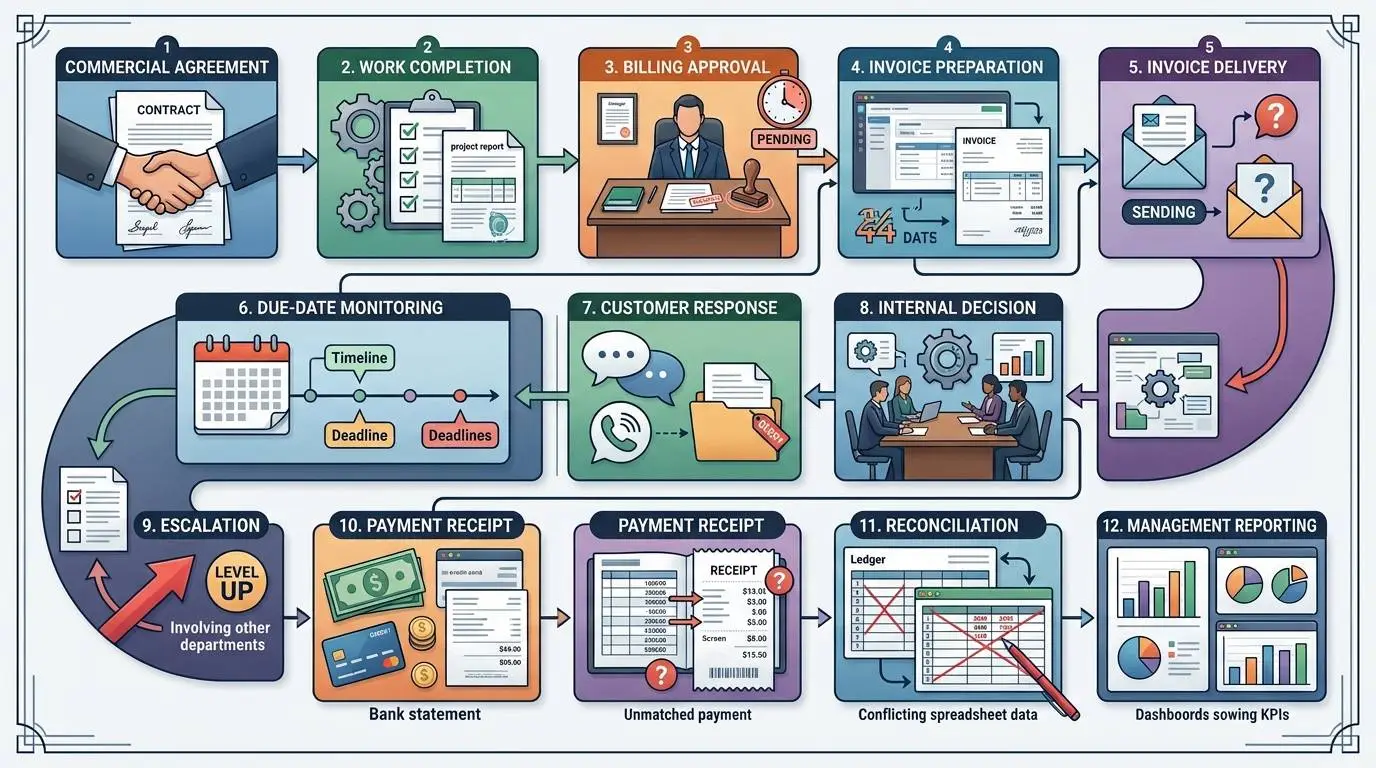
Step 1: The commercial agreement is handed to operations
Before work begins, someone agrees to:
- Price
- Scope
- Payment terms
- Deposits
- Milestones
- Reimbursable expenses
- Purchase-order requirements
- Billing contacts
- Approval requirements
In a manual workflow, these details may be distributed among the proposal, contract, CRM notes, email, project brief, and one employee’s memory.
The first hidden task appears when billing later tries to determine which version is correct.
Common failure
The salesperson negotiates Net 45 terms, but the accounting system defaults to Net 30.
The invoice is not necessarily wrong in amount. It is wrong in expectation.
The customer sees one due date. The internal team expects another. Follow-up begins before both sides agree that the invoice is late.
Ownership question
Who is responsible for confirming that the final commercial terms reached billing?
“Sales” is not a sufficient answer. A person or role must own the handoff.
Step 2: Someone decides that the work is billable
For recurring services, the billing trigger may be a calendar date.
For project businesses, it may depend on:
- Milestone completion
- Approved deliverables
- Signed timesheets
- Client acceptance
- Shipment
- Placement of a candidate
- Delivery of hardware
- Completion of a service period
In a manual process, the trigger is often a message:
We can invoice this now.
That message may arrive late, lack supporting documents, or fail to identify the correct amount.
Hidden labor
The bookkeeper asks whether the work is complete.
The project manager checks with the delivery team.
The delivery team asks whether the client approved the change order.
The salesperson looks for the latest contract.
No one describes these exchanges as accounts receivable work, but they exist because billing cannot proceed without them.
Step 3: Billing reconstructs the invoice
The person creating the invoice gathers:
- Customer legal name
- Billing address
- Tax information
- PO number
- Description
- Rate or milestone value
- Payment term
- Supporting documents
- Billing contact
- Submission instructions
When information is missing, invoice preparation becomes investigative work.
The cost is not only the time required to create the invoice. It includes the delay between earning the right to bill and presenting a valid request for payment.
A customer cannot approve an invoice that has not been submitted.
Step 4: The invoice is delivered
Emailing a PDF does not prove that the invoice entered the customer’s payment process.
The invoice may have been:
- Sent to a former employee
- Blocked by email filtering
- Submitted without a required PO
- Sent to the business contact instead of accounts payable
- Rejected by a customer portal
- Delivered without supporting documentation
- Sent to the wrong legal entity
- Received but never approved internally
Federal Reserve-backed B2B payment initiatives have treated electronic invoice exchange, payment data, and remittance information as connected parts of an end-to-end process. The underlying goal is not merely to replace paper; it is to improve efficiency, transparency, error reduction, and cash management across the process.
Manual workaround
The bookkeeper marks the invoice as sent.
Two weeks later, the customer says it was never received.
The team then resends the same invoice and effectively restarts the payment clock, even though the accounting record has already been aging it.
Step 5: Someone monitors the due date
A manual reminder system may consist of:
- Calendar events
- Spreadsheet dates
- Stars in an inbox
- Notes in the accounting platform
- Weekly aging meetings
- The owner checking the bank balance
- A bookkeeper reviewing overdue invoices when time permits
Each method can work at low volume.
The problem appears when several systems are used at once.
One person updates the spreadsheet. Another adds a note to the invoice. A third sends an email but does not record it. The next person cannot tell whether the absence of a note means no action was taken or the action was simply not documented.
Step 6: The customer responds
Customer responses create the most important branching point in the workflow.
A reply may mean:
- Payment is scheduled
- Payment was already sent
- The invoice needs to be resubmitted
- The customer disputes the amount
- Approval is delayed
- A document is missing
- The contact has changed
- The customer requests a payment plan
- The customer has stopped responding
A manual process often handles every reply inside the sender’s inbox.
This turns the inbox into an unofficial collection system.
The customer status may be known to one person but remain invisible to everyone else.
Step 7: Internal teams decide what the response means
A message such as “We are reviewing the invoice” does not have one universal meaning.
It could indicate:
- Normal internal processing
- A soft dispute
- Missing documentation
- A delayed budget approval
- A polite attempt to postpone payment
- No meaningful progress
Someone must interpret the response and decide what happens next.
Automation can record the message and create a task. Human judgment is still needed to classify the situation and choose an appropriate action.
Step 8: Follow-up escalates
After the first reminder, ownership often becomes unclear.
Should the next message come from:
- The bookkeeper
- The account manager
- The project manager
- The controller
- The owner
- Legal counsel
- An external collection provider
The answer depends on value, relationship, dispute status, contract terms, customer behavior, and the company’s willingness to pause work.
Without a defined escalation path, the team either follows up inconsistently or gathers several people to discuss a decision that should already have a rule.
Step 9: Payment arrives
Payment receipt creates another handoff.
The payment may arrive by:
- ACH
- Wire
- Check
- Card
- Customer payment portal
- Third-party payment platform
The company must determine:
- Which customer paid
- Which invoices were covered
- Whether the payment was complete
- Whether fees or deductions were taken
- Whether a credit was applied
- Whether the accounting record should be updated
- Whether collection activity should stop
Standardized remittance information helps explain what a payment covers. Industry work on remittance standards is intended to reduce misunderstandings and incorrect processing during payment reconciliation.
Step 10: Management asks for a cash update
The aging report shows accounting balances.
Management usually wants operational answers:
- Which invoices are actually expected this week?
- Which customers promised payment?
- Which balances are disputed?
- Which invoices were never received?
- Which accounts need an executive call?
- Which receipts arrived but remain unapplied?
- Which customers are unlikely to pay soon?
When that information lives across several people and systems, preparing a cash update becomes a recurring research project.
The Four Types of Invisible AR Work
Manual AR cost is easier to diagnose when the work is divided into four categories.
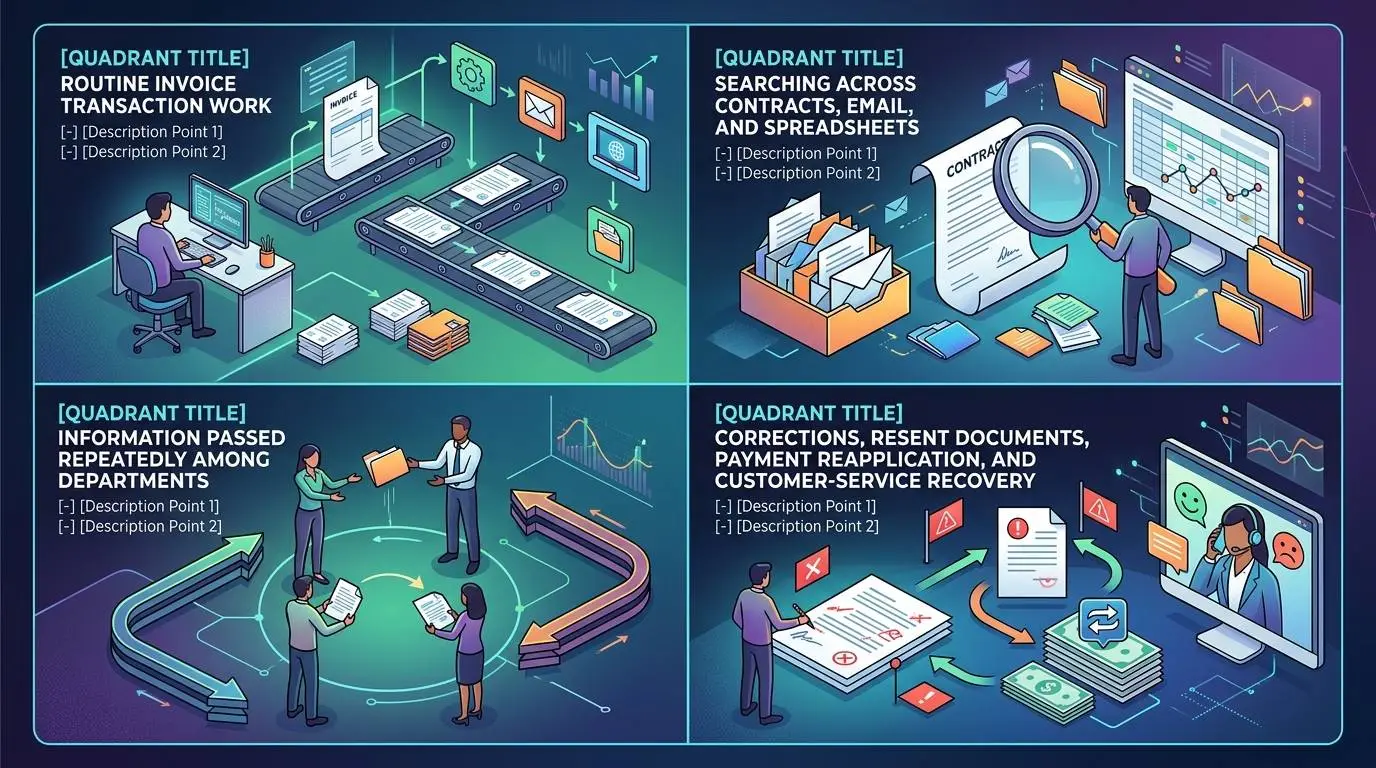
1. Transaction work
This is the work most companies recognize:
- Creating invoices
- Sending statements
- Recording payments
- Preparing aging reports
- Sending reminders
It is visible, countable, and usually assigned to finance.
2. Reconstruction work
This is the time spent locating facts that should already be available:
- Finding the signed agreement
- Confirming the correct rate
- Locating a PO
- Searching for approval
- Checking who received the invoice
- Reconstructing the reminder history
- Determining which invoice a payment covers
Reconstruction work is usually excluded from AR time estimates because it occurs inside sales, operations, project management, and management.
3. Coordination work
This is the time spent moving information between people:
- Asking whether a milestone is complete
- Requesting a corrected invoice
- Forwarding customer responses
- Scheduling an escalation discussion
- Confirming that someone else will follow up
- Updating multiple records
Coordination is necessary when the process is fragmented. It does not directly create an invoice, resolve a dispute, or collect cash.
4. Recovery work
This is the work created by an earlier failure:
- Correcting an invoice
- Apologizing for an inappropriate reminder
- Resending supporting documents
- Reapplying a payment
- Reopening a closed dispute
- Explaining contradictory information
- Repairing a customer relationship
Recovery work is particularly expensive because it repeats part of the original process and may involve higher-paid staff.
Where Ownership Gaps Appear
An ownership gap exists when a required next action has no clearly accountable person.
Typical gaps include:
| Event | Common assumption | Result |
|---|---|---|
| Project completed | Project manager assumes finance can see it | Invoice is delayed |
| Client changes billing contact | Account manager assumes customer will redirect invoices | Future invoices go to the wrong person |
| Invoice disputed | Bookkeeper assumes account lead will handle it | Reminder sequence continues |
| Customer promises payment | Account manager assumes finance recorded the date | Another reminder is sent too soon |
| Partial payment received | Accountant assumes bookkeeper knows the deduction reason | Balance remains unresolved |
| Client becomes seriously overdue | Finance assumes owner will decide about service | Work continues without a credit decision |
| Payment received | Bank feed shows deposit, but no one owns matching | Customer is reminded after paying |
The answer is not to make one person responsible for every task.
That can create control and capacity problems.
AICPA and CIMA emphasize that revenue and cash-receipt processes require controls against both fraud and unintentional misstatement, including in smaller organizations. Controls should reflect the company’s real risks.
The better design is to separate task ownership from process visibility:
- Different people may perform different duties.
- Everyone who needs the status should be able to see it.
- Every invoice should have one defined next action.
- Every next action should have one accountable owner.
- High-risk actions should still require approval or review.
How Data Handoffs Fail
A handoff fails when information moves late, incompletely, inaccurately, or without an accountable recipient.
The information arrives too late
The project manager sends approval after the billing cycle has closed.
The invoice waits another week.
The information is incomplete
Finance is told to invoice the project but receives no PO, milestone breakdown, or reimbursable expenses.
The information conflicts with another record
The contract says Net 30. The CRM says Net 45. The accounting platform applies Net 15.
The information reaches the wrong person
The customer tells the salesperson that a new AP contact has been assigned. The billing database is not updated.
The recipient does not know what action is required
An email says the client “has questions.” It does not identify whether the invoice should be paused, corrected, defended, or escalated.
The handoff has no confirmation
The sender assumes the issue was received. The recipient assumes it was informational only.
This is why adding more fields to a spreadsheet does not always solve the problem.
A field can store information. It cannot guarantee that the information is timely, trusted, complete, or connected to an action.
Why Duplicate Work Becomes Normal
Duplicate work is not always obvious duplication.
Two employees may perform different activities that serve the same purpose:
- The bookkeeper checks the aging report.
- The owner checks the bank account.
- The account manager reviews customer emails.
- The project manager checks whether work was approved.
All four are trying to answer:
What is preventing payment?
Because no shared record answers the question, each person investigates from a different direction.
The same pattern appears in customer communication:
- Finance sends a reminder.
- The account manager separately asks the client for an update.
- The owner calls the client’s owner.
- The customer receives three messages but still lacks the missing document needed to approve payment.
More activity does not necessarily mean more progress.
Why Follow-Ups Are Forgotten
Forgotten follow-up is often described as a discipline problem.
Sometimes it is. More often, the task lacks one of four elements:
- A trigger
- An owner
- A due date
- A visible status
Consider a customer that says payment will be made next Friday.
The account manager remembers the promise but does not record it. The bookkeeper sees the balance on Thursday and sends another reminder. The owner assumes the account is being handled.
No one intentionally ignored the invoice. The workflow failed to convert a customer promise into a dated next action.
A reminder system is useful because it can preserve dates and assignments. It still needs accurate status information from the people handling exceptions.
How Fragmented Communication Affects Customers
From the supplier’s perspective, internal roles may be distinct.
From the customer’s perspective, all messages come from one company.
The customer does not care that:
- Sales promised one term.
- Finance used another.
- The project manager forgot to provide approval.
- The account manager did not update the billing contact.
- The bookkeeper could not see the dispute.
- The accountant had not applied the payment.
The customer sees contradiction.
Common customer-facing failures include:
- A reminder arrives after payment.
- A disputed invoice continues receiving automated notices.
- Different employees quote different balances.
- The customer must resend the same document.
- Finance asks a question already answered to the account manager.
- An escalation message arrives before a promised payment date.
- A strategic client receives a generic message that ignores the relationship context.
The cost is not limited to annoyance.
Fragmented communication teaches customers that the supplier’s records are unreliable. That can make future invoice questions harder to resolve because the company begins each conversation with less credibility.
The Cost of Fragmented Responsibility
The full cost has several components.
Direct labor
Time spent creating invoices, sending reminders, updating spreadsheets, matching receipts, and preparing reports.
Rework
Time spent correcting errors, resending documents, updating duplicate records, and repeating communication.
Management interruption
Owner, controller, sales, and project time consumed by questions that should have been resolved at a lower level.
Billing delay
Time between the company earning the right to invoice and submitting a correct invoice.
Collection delay
Time lost because reminders, responses, promises, and disputes do not lead promptly to the next action.
Customer friction
The operational and relationship cost of contradictory, repetitive, or inappropriate communication.
Control risk
The risk that errors, unauthorized changes, unrecorded credits, incorrect applications, or misleading balances are not detected promptly.
The Federal Reserve Banks’ 2025 small-business survey reported that 51% of surveyed employer firms cited uneven cash flow as a financial challenge. The survey used a nationwide convenience sample, so the percentage should be treated as directional rather than a precise estimate for every business.
The statistic does not measure manual AR labor. It shows why small operational delays matter: when cash timing is already uneven, additional avoidable uncertainty makes planning more difficult.
Illustrative Weekly Cost Calculation
The following example is illustrative only. It is not a benchmark or market average.
Assume a B2B service company issues 120 invoices per month.
Its manual workflow creates:
- An average of 18 minutes of searching, copying, checking, or updating per invoice
- Eight invoice exceptions per month requiring 45 minutes of duplicated internal discussion
- Twelve payments per month requiring 15 minutes of manual investigation
- Two hours per week of owner review and status chasing
Invoice-related administrative time
120 invoices × 18 minutes = 2,160 minutes 2,160 minutes ÷ 60 = 36 hours
Exception coordination
8 exceptions × 45 minutes = 360 minutes 360 minutes ÷ 60 = 6 hours
Payment investigation
12 payments × 15 minutes = 180 minutes 180 minutes ÷ 60 = 3 hours
Owner review
2 hours × 4 weeks = 8 hours
Total visible and reconstructed effort
36 + 6 + 3 + 8 = 53 hours per month
At an illustrative blended loaded labor cost of $42 per hour:
53 × $42 = $2,226 per month
This calculation still excludes:
- The cost of delayed billing
- Financing costs
- Customer relationship damage
- Errors that are never identified
- Time spent by the customer resolving the supplier’s mistakes
The purpose of the calculation is not to prove that software will save $2,226.
A portion of the work remains necessary. Some of it requires judgment. Some may be reduced through clearer policies rather than automation.
The first objective is to identify how much of the 53 hours is:
- Necessary transaction work
- Preventable reconstruction
- Preventable coordination
- Preventable recovery
What Should Be Standardized Before It Is Automated?
Automation is strongest when it executes a clear rule.
Before automating, define:
The billing trigger
What exact event means an invoice can be created?
Required billing information
Which fields and documents must be present before submission?
The delivery method
Who receives the invoice, through which channel, and how is successful delivery confirmed?
Reminder timing
When does follow-up begin, and what changes at each stage?
Stop conditions
What events pause routine reminders?
Examples include payment, dispute, promised payment, payment plan, legal review, or service-suspension review.
Exception ownership
Who handles incorrect invoices, missing POs, disputed scope, partial payments, and strategic accounts?
Escalation authority
Who can approve a credit, payment plan, service pause, external collection, or write-off?
Without these rules, automation does not eliminate ambiguity. It processes ambiguity faster.
Tasks Suitable for Automation
The strongest candidates are repeated tasks with clear inputs and predictable outputs.
These may include:
- Creating a billing task when an approved milestone is completed
- Generating recurring invoices from validated data
- Checking for required invoice fields
- Delivering invoices through a standard channel
- Recording delivery failures
- Scheduling pre-due and overdue reminders
- Assigning collection tasks
- Recording the last action and next action
- Suppressing reminders after payment
- Producing aging and workload reports
- Matching routine payments with clear remittance information
- Alerting staff when an invoice requires manual review
The purpose is not to remove every touch.
It is to stop spending human attention on tasks that do not require interpretation.
Tasks That Require Human Control
Human judgment remains important when the company must interpret evidence, balance competing interests, or exercise authority.
These tasks include:
- Negotiating payment terms
- Approving customer exceptions
- Determining whether work satisfies the agreement
- Evaluating a scope dispute
- Deciding whether a deduction is valid
- Approving credits or write-offs
- Negotiating payment plans
- Managing strategic client communication
- Assessing customer credit risk
- Deciding whether to pause service
- Determining whether legal or external collection action is appropriate
- Reviewing sensitive changes to bank or payment information
Separating duties can strengthen controls, but separation alone is not enough. The workflow must still make responsibility and status visible. AFP specifically highlights separation across credit approval, invoicing, and payment application as an AR control consideration.
When a Manual Process Is Still Reasonable
Manual AR is not automatically bad.
It may remain appropriate when:
- Invoice volume is low
- Invoices are simple and repetitive
- Customers pay predictably
- Few people participate in the workflow
- Disputes are rare
- Payment matching is straightforward
- The process is documented
- Responsibilities are clear
- Management can see current status without reconstructing it
- The labor cost of automation would exceed the likely benefit
A well-controlled manual process can outperform a poorly configured automated one.
The warning sign is not the presence of spreadsheets or email.
The warning sign is that the company cannot answer basic questions without asking several people.

A Practical AR Handoff Audit
Select ten recent invoices:
- Two paid on time
- Three paid late
- Two corrected
- Two disputed
- One still unresolved
For each invoice, record:
- What authorized billing?
- When did the authorization occur?
- When was the invoice created?
- What information was missing?
- Who supplied the missing information?
- How was the invoice delivered?
- Was delivery confirmed?
- Who sent the first follow-up?
- Where was the customer response recorded?
- Was the invoice disputed?
- Who owned the dispute?
- Did the customer promise a payment date?
- Was that date visible to finance?
- When did payment arrive?
- How long did payment application take?
- How many people touched the invoice?
- Which work was repeated?
- Which step waited for someone to remember?
- Which step could have followed a rule?
- Which step required judgment?
Do not begin by asking which software feature is missing.
Begin by asking which information, action, and owner were missing.
Record every search, handoff, correction, duplicated update, and unanswered ownership question. The pattern will show where the process needs clearer rules—and where automation may later help.
The Practical Conclusion
The most expensive part of a manual accounts receivable process is often not invoice creation or sending reminders.
It is the time spent reconstructing reality.
The owner wants to know what cash is coming.
The bookkeeper knows what the accounting system says.
The project manager knows whether the work was approved.
The salesperson knows what was promised.
The account manager knows what the customer said.
The accountant knows what reached the bank.
The process fails when these pieces do not reliably become one shared status and one defined next action.
Before buying another tool, map the journey of ten recent invoices.
Mark every point where someone had to:
- Search
- Ask
- Copy
- Correct
- Reconfirm
- Interpret
- Chase
- Apologize
Those are the places where hours quietly disappear.
Some should be automated.
Some should be standardized.
Some should remain human decisions.
The first improvement is knowing the difference.
This guide provides general business information, not accounting, financial, credit, collection, internal-control, or legal advice. Survey findings are directional and may not represent every small business. Collection rights, payment rules, software capabilities, and control requirements can change; verify current details before acting.