
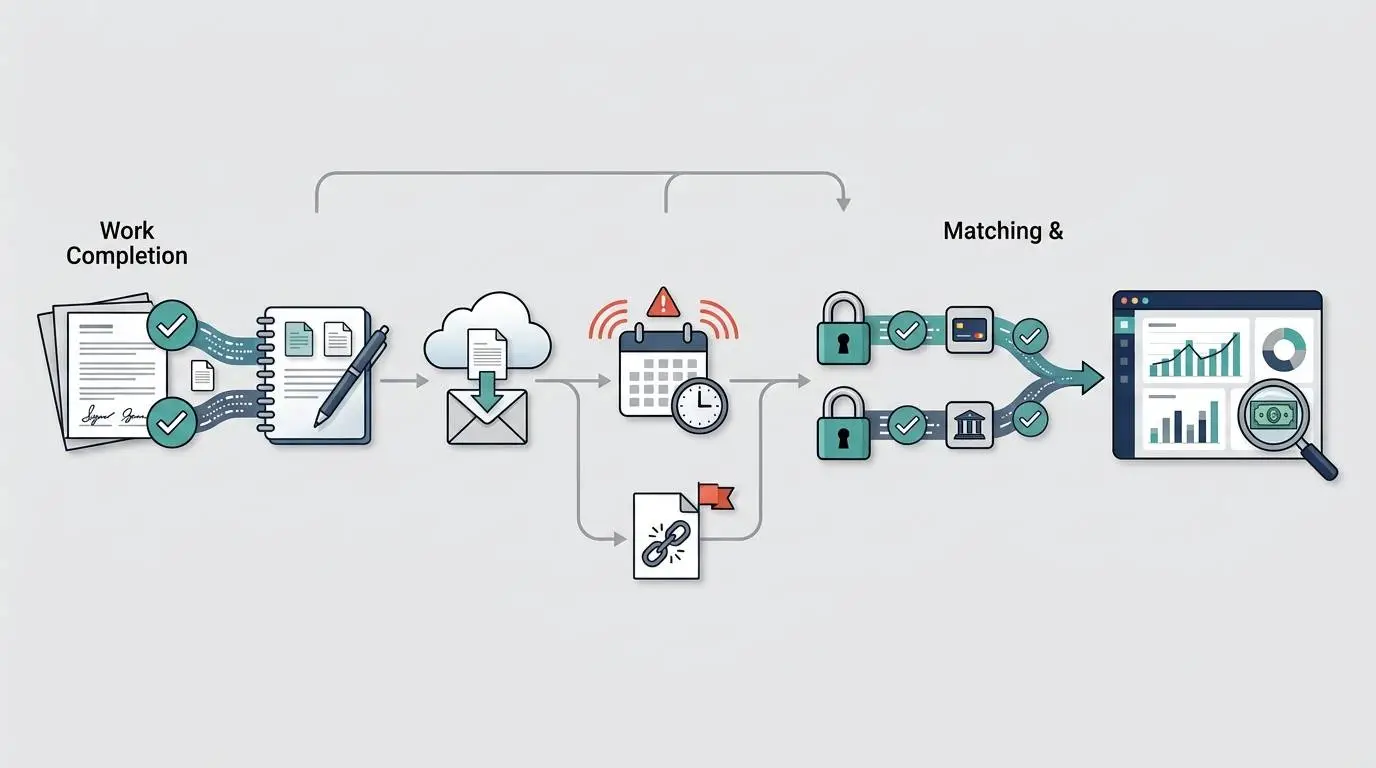
- Accounts receivable automation works across invoice creation, delivery, follow-up, payment, cash application, and reporting—not only reminders.
- Software is strongest at repeated, rule-based work; people still need to handle disputes, exceptions, credit decisions, and sensitive customer conversations.
- Incorrect invoices, unclear terms, missing approvals, and customers that cannot pay are process or management problems before they are automation problems.
- The economics improve when invoice volume, manual effort, financing pressure, and preventable delays are measurable.
- Audit the last 30 invoices before buying software; the delay patterns will show what should be standardized, fixed, or automated.
It is Friday afternoon. Payroll will be processed on Monday.
The accounting system shows $186,000 in open receivables. That sounds reassuring until someone tries to determine how much of it will actually arrive next week.
One large invoice was sent to an employee who left the client company. Another is waiting for a purchase-order number. A project manager says the work was approved, but the approval is buried in a message thread. Three customers usually pay after a second reminder. One customer disputes part of the bill, although the full balance still appears as overdue.
The owner asks a simple question:
Who is following up, and what cash should we realistically expect?
The bookkeeper opens the aging report. The project manager searches email. The owner messages the account lead. No one has a complete answer.
This is the problem that accounts receivable automation is supposed to solve.
But buying reminder software would address only part of it.
The real issue is that completed work, customer approval, invoice creation, invoice delivery, collections, dispute resolution, payment, and reconciliation have never been managed as one connected operating process.
Accounts Receivable Automation Is an Operating System, Not a Reminder Button
Accounts receivable automation is the use of rules, workflows, integrations, and digital payment processes to reduce repetitive work across the path from completed work to usable cash.
That path is often called the invoice-to-cash process.
A useful AR automation system may help a company:
- Create or schedule invoices from approved information
- Validate required invoice fields
- Deliver invoices to the correct contact
- Send pre-due and overdue communications
- Prioritize collection work
- Record customer responses
- Provide payment options
- Match incoming payments to invoices
- Update accounting records
- Report expected and overdue cash
Those capabilities matter because accounts receivable is not the same as cash. The U.S. Small Business Administration explains that accrual accounting records a sale when it is completed, while cash accounting records it when payment is received. A company can consequently report healthy revenue while still struggling to fund payroll, contractors, advertising, rent, software, or taxes.
AR automation may shorten the gap between earning revenue and receiving cash. It does not eliminate every reason that gap exists.
Small-business data helps explain why collection timing matters. In the Federal Reserve Banks’ 2025 report on employer firms, 51% cited uneven cash flow as a financial challenge. The 2026 report found that 56% of firms seeking financing did so to meet operating expenses. Neither result proves that accounts receivable caused the financing need, but both show why revenue on paper and usable cash can diverge. The surveys use nationwide convenience samples, so the percentages are directional rather than precise estimates for every business.
The Complete Invoice-to-Cash Workflow
Many small teams begin evaluating AR software at the reminder stage. That is usually too late in the process.
A better evaluation begins with the full workflow.
| Stage | Operational question | What can be automated? | What still requires human control? |
|---|---|---|---|
| 1. Commercial terms | What was the customer promised, and when is payment due? | Standard contract fields, approved term options, customer records | Negotiating terms, approving exceptions, assessing customer risk |
| 2. Work completion | Has the service, milestone, placement, shipment, or project actually been completed? | Completion notifications, system status changes, recurring billing triggers | Determining whether work meets the contract |
| 3. Customer approval | Is approval, a timesheet, purchase order, or acceptance document required? | Approval routing, missing-document alerts, status tracking | Resolving disputed or ambiguous acceptance |
| 4. Invoice creation | Is the invoice accurate and complete? | Templates, recurring invoices, tax and customer-field rules, duplicate checks | Reviewing unusual charges, scope changes, credits, and exceptions |
| 5. Invoice delivery | Did the invoice reach the correct person and system? | Email delivery, customer portals, e-invoice transmission, bounce alerts | Finding a new contact or navigating a customer-specific submission problem |
| 6. Pre-due management | Does the customer have what is needed to pay on time? | Statements, pre-due reminders, payment links, document delivery | Handling early questions and strategic-account exceptions |
| 7. Collections | Who follows up, when, and with what authority? | Reminder sequences, work queues, aging-based prioritization, task assignment | Negotiation, escalation, relationship management, service-suspension decisions |
| 8. Dispute resolution | Is the invoice simply late, or does the customer reject part of it? | Case routing, status fields, document collection, internal notifications | Determining validity, approving credits, renegotiating scope |
| 9. Payment | Can the customer pay through an acceptable channel? | Online payment options, autopay where authorized, payment-status updates | Approving payment plans, unusual methods, or account changes |
| 10. Cash application | Which invoices does the incoming payment settle? | Matching payment and remittance data, posting routine receipts | Investigating short pays, combined payments, unidentified cash, or deductions |
| 11. Reporting | What cash is likely to arrive, and where are delays originating? | Aging dashboards, promise-to-pay tracking, workflow reporting | Interpreting trends and deciding corrective action |
The Federal Reserve and the Business Payments Coalition have supported standards and industry work around electronic invoices, payments, and remittance information because these are connected parts of the B2B payment process. Digitizing one document while leaving the surrounding workflow fragmented creates only partial automation.
Manual AR Versus Automated AR
The difference between a manual and automated process is not that people disappear.
The difference is that people stop spending as much time reconstructing routine facts.
| Activity | Predominantly manual process | Well-designed automated process |
|---|---|---|
| Billing trigger | Someone remembers to tell the bookkeeper | Approved completion event creates a billing task |
| Invoice preparation | Information copied from contracts, spreadsheets, and messages | Approved fields flow into an invoice draft |
| Invoice delivery | PDF emailed to a saved contact | Invoice sent through the required channel with delivery status |
| Reminder timing | Calendar notes or memory | Rules schedule communications by due date and customer segment |
| Collection ownership | Owner, bookkeeper, and account manager assume someone else followed up | Each overdue account has an assigned owner and next action |
| Customer response | Scattered across inboxes | Response is attached to the account or collection record |
| Disputes | Overdue invoice remains in the reminder sequence | Disputed amount is routed to a separate review workflow |
| Payment collection | Customer asks how to pay | Invoice or portal presents approved payment methods |
| Cash application | Bank activity manually compared with open invoices | Routine payments are matched; exceptions are queued for review |
| Cash visibility | Aging report reviewed after the fact | Aging, promises, disputes, and expected cash are visible together |
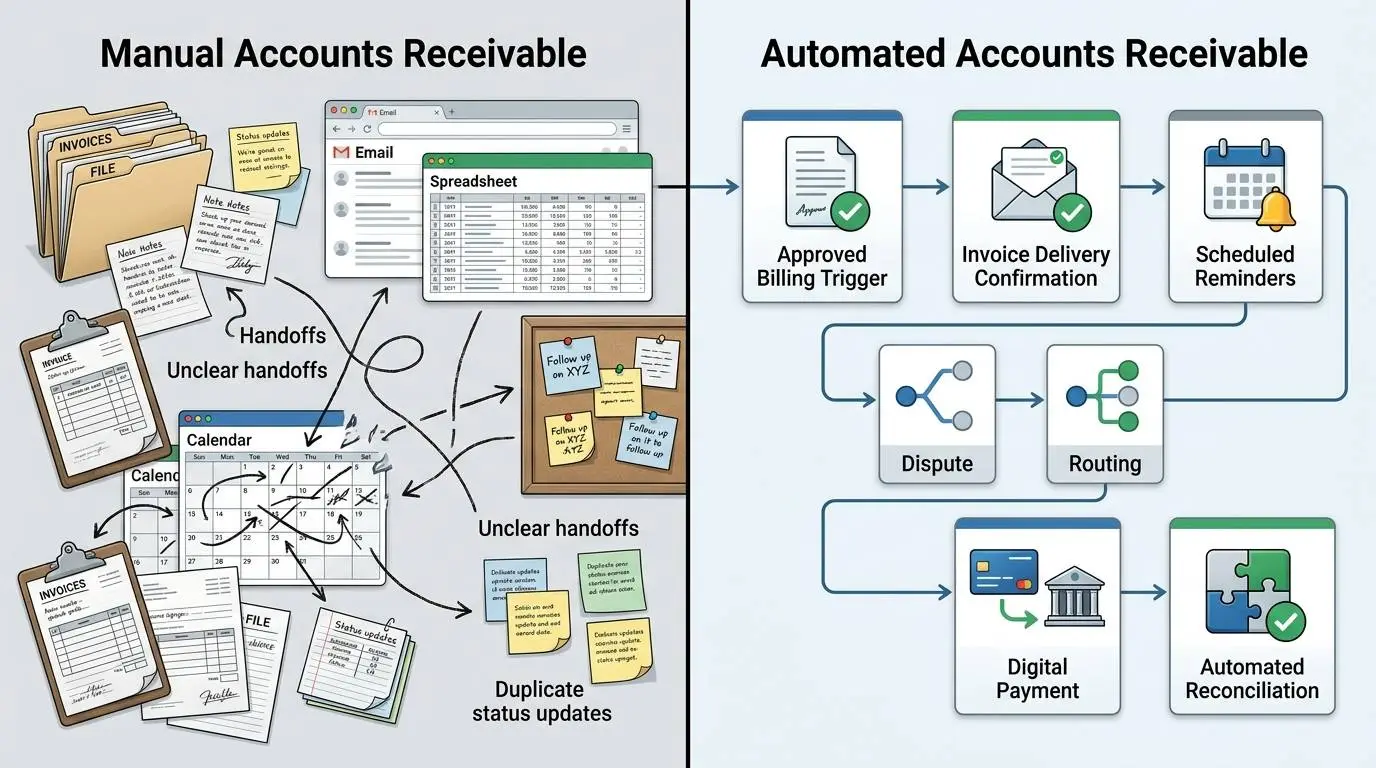
The goal is not “zero human involvement.”
The goal is routine work by system, exception work by people.
What AR Automation Can Do Well
1. Make invoice creation more consistent
Automation can generate recurring invoices, pull approved customer data, require specific fields, apply standard payment terms, and prevent some duplicate or incomplete records.
This is valuable when the company repeatedly issues similar invoices.
It is less useful when every invoice depends on a custom interpretation of scope, undocumented changes, or incomplete project records. In that environment, faster invoice generation may simply create incorrect invoices sooner.
2. Reduce the delay between completed work and billing
An invoice cannot be paid before it is created and delivered.
When billing depends on someone remembering to notify finance, several days may pass after work is complete. A workflow trigger can create a billing task as soon as a project milestone, approved timesheet, shipment, service period, or recurring date is reached.
That does not mean the invoice should always be sent automatically. High-value or nonstandard invoices may still require review.
3. Standardize reminder timing
A system can reliably send a reminder seven days before the due date, on the due date, or after a defined period of delinquency.
This prevents routine follow-up from depending on the owner’s memory or the bookkeeper’s available time.
The system should not, however, continue sending the same sequence when:
- The customer has opened a valid dispute
- The invoice was sent to the wrong entity
- A payment has already been made but not applied
- The account has a negotiated payment plan
- The customer is strategically important and requires coordinated communication
- Legal or service-suspension review has begun
Reminder automation works best when it can stop, branch, or escalate based on account status.
4. Give collectors a prioritized work queue
An aging report tells a team what is unpaid. It does not always tell the team what to do next.
A more useful collection queue may distinguish between:
- Large invoices with no customer response
- Customers that promised payment
- Repeated late payers
- Invoices with delivery failures
- Open disputes
- Small balances that are uneconomical to pursue manually
- Strategic accounts requiring account-manager involvement
This turns collections from a chronological inbox problem into a decision process.
5. Improve payment convenience
Electronic invoices, online portals, payment links, stored methods, or authorized automatic payments can remove avoidable friction.
Providing a faster payment method does not force a financially distressed customer to pay. It simply reduces the chance that a willing customer is delayed by missing instructions, check processing, or an unnecessary request for bank details.
6. Assist with cash application
Receiving money is not the final step.
A payment may cover several invoices, exclude a disputed amount, include an unexplained deduction, or arrive without useful remittance information. Automation can match routine receipts and send exceptions to a person.
The Association for Financial Professionals describes cash application as part of the broader receivables process and notes that matching payments to invoices can be tedious enough for companies to use third-party solutions. Technology can improve speed, but its value still has to be weighed against cost.
7. Improve operational visibility
A standard aging report groups balances by age. A more complete AR view may also show:
- Invoice delivery status
- Last customer contact
- Next collection action
- Open disputes
- Promised payment dates
- Assigned owner
- Unapplied cash
- Expected receipts
- Repeated correction causes
Useful measures may include DSO, average days delinquent, receivables turnover, dispute rates, bad-debt write-offs, and the cost of credit. No single metric explains the complete process, but together they can show where investigation is needed.
What Accounts Receivable Automation Cannot Fix
Unclear commercial terms
If the contract does not clearly define the price, milestone, payment term, reimbursable expense, late-payment policy, or acceptance requirement, the collection problem begins before the invoice exists.
Automation can reproduce the recorded term. It cannot determine what the parties intended.
Missing proof of approval
A customer may refuse to pay because no one can produce the approved timesheet, delivery confirmation, purchase order, change order, or project acceptance.
A system can store and route evidence. It cannot create evidence that the team failed to obtain.
Incorrect invoices
Incorrect customer names, legal entities, tax details, PO numbers, dates, rates, quantities, and billing contacts create avoidable delays.
Automating invoice delivery without correcting the source data may increase the volume of errors.
Scope and service disputes
A customer who believes the work was incomplete does not need another automated reminder. The customer needs a decision from someone who understands the agreement and the work delivered.
Disputes should be removed from the standard reminder sequence and given an owner, deadline, and resolution path.
Customers that cannot pay
No collection workflow can manufacture liquidity for a customer in financial distress.
The business may need to make a credit decision, negotiate a payment plan, suspend further work, seek professional collection assistance, or accept a potential loss.
These are management decisions, not reminder settings.
Weak internal ownership
If sales expects finance to protect the relationship, finance expects the project manager to resolve the dispute, and the project manager assumes the owner will make the call, automation may only document the delay.
Every exception still needs an accountable person.
Poor customer relationships
Aggressive automated communication can make a sensitive account worse, particularly when the business contributed to the problem.
Automation should not be used to avoid a difficult conversation.
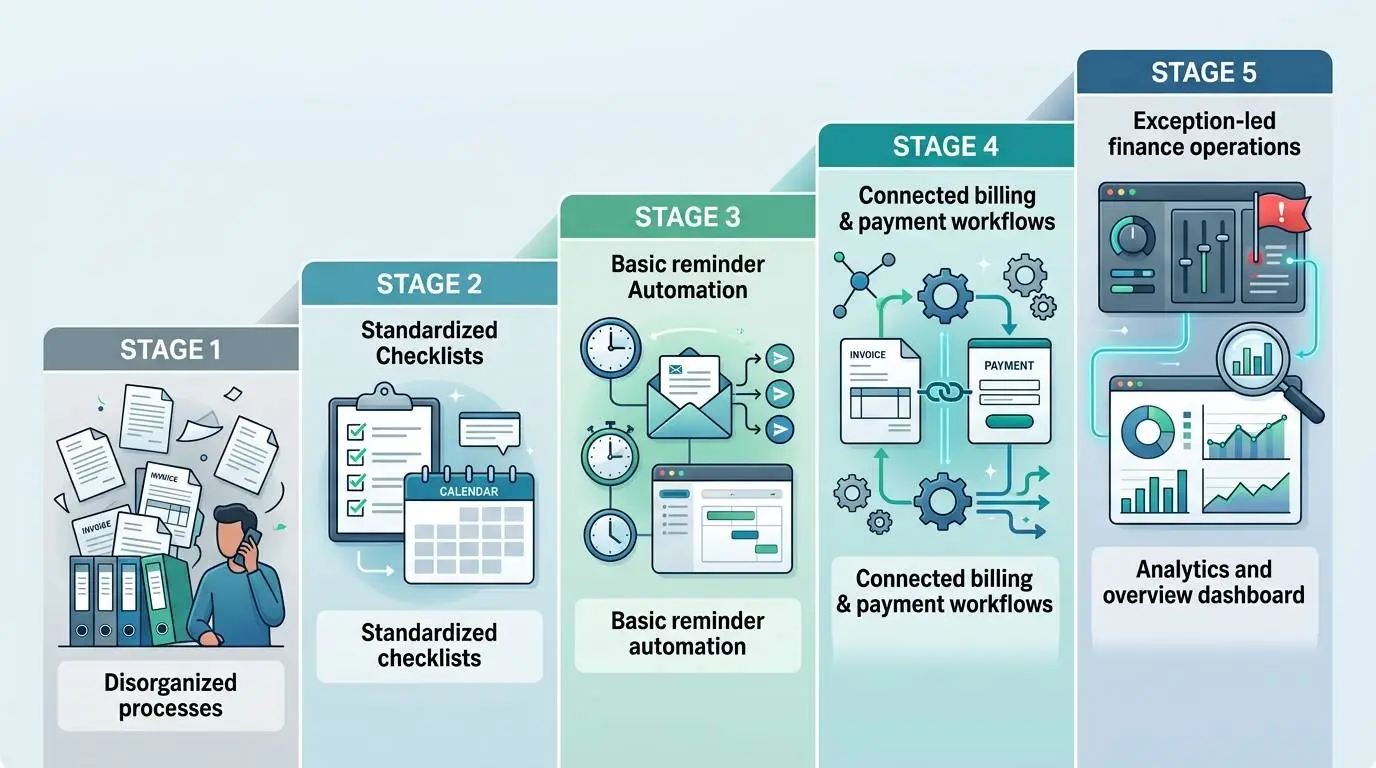
The Five-Level AR Automation Maturity Model
Software selection should match the maturity of the process.
Buying a highly configurable platform while operating at Level 1 often produces expensive confusion.
| Level | Operating pattern | Main limitation | Appropriate next move |
|---|---|---|---|
| 1. Reactive | Invoices and reminders depend on individual memory | No reliable process or ownership | Document the current workflow and assign responsibilities |
| 2. Standardized manual | Terms, templates, reminder timing, and owners are defined | Repetitive work consumes time | Automate routine reminders and task creation |
| 3. Basic automation | Invoices and reminders run from accounting data | Disputes, promises, and exceptions remain scattered | Add workflow status, customer segmentation, and exception routing |
| 4. Connected workflow | Billing, collections, payment, and accounting data are integrated | Management may still optimize the wrong metrics | Measure root causes, not only overdue balances |
| 5. Exception-led operations | Routine accounts move automatically; staff focus on exceptions | Risk of overengineering or excessive automation | Continuously test economics, customer experience, and control quality |
Level 1: Reactive
The owner or bookkeeper checks the aging report when cash feels tight.
There is no standard reminder schedule. Customer contact information may be outdated. Follow-up is inconsistent. Decisions live in email or memory.
The priority is not buying software.
The priority is making the process visible.
Level 2: Standardized manual
The company has documented terms, a billing checklist, a reminder calendar, assigned owners, and defined escalation points.
The work is still manual, but it is repeatable.
This is usually the earliest stage at which automation can provide reliable value, because the system has rules to execute.
Level 3: Basic automation
Invoices and routine reminders are sent automatically. Aging data is current, and basic payment links may be available.
However, customer replies, disputes, and special arrangements still move outside the system.
The next improvement is not necessarily more reminders. It is better exception management.
Level 4: Connected workflow
The accounting platform, CRM, project or service system, payment tools, and collection workflow exchange relevant information.
The company can see why an invoice is unpaid, who owns the next action, and whether payment is likely.
At this stage, integration and governance often matter more than adding another reminder feature.
Level 5: Exception-led operations
Routine invoices move through the process with little intervention. Staff concentrate on strategic accounts, disputes, unusual deductions, credit risk, and process improvement.
Automation has not removed judgment. It has reserved judgment for the places where it creates the most value.
Do We Need AR Automation?
The answer depends on the cause and frequency of the problem.
| Current symptom | Likely underlying cause | Automation fit | Process action first |
|---|---|---|---|
| Reminders are regularly forgotten | Repetitive workload and weak scheduling | High | Define timing, tone, and stop conditions |
| Invoices are frequently corrected | Bad source data or weak billing review | Low until corrected | Analyze the last 30 corrections |
| Customers say they never received invoices | Delivery and contact-data failure | High | Confirm billing contacts and submission methods |
| Most overdue value comes from one customer | Concentration or customer-specific issue | Low to moderate | Review the relationship, contract, and credit exposure |
| Staff spend hours updating collection spreadsheets | Duplicate data entry and fragmented ownership | High | Define one source of truth |
| Customers frequently dispute scope | Contracting, approval, or delivery failure | Low | Repair commercial and project handoffs |
| Payments arrive but remain unapplied | Missing remittance information or matching workload | Moderate to high | Categorize exception types |
| The company issues only a few invoices monthly | Low transaction volume | Often low | Compare software cost with actual labor and delay |
| Cash forecasts are unreliable | Missing status and promise-to-pay information | Moderate to high | Define what evidence supports expected payment |
| The team already follows up consistently | Limited operational problem | Uncertain | Identify the specific outcome software would improve |
A useful decision rule is:
Automate when the problem is repeated, rule-based, measurable, and expensive enough to justify changing the process.
Do not automate merely because a feature exists.
When Does AR Automation Pay Off?
The business case usually comes from a combination of four value sources:
- Reduced administrative labor
- Fewer preventable invoice and delivery errors
- Lower financing or working-capital pressure
- Better prioritization of collection activity
The business case should not count the entire value of overdue invoices as software ROI. The invoices were already assets of the business, and not all late payments become losses.
A more defensible model measures the incremental economic effect.
Illustrative ROI calculation
The following figures are examples only. They are not market averages or expected results.
Assume a B2B services company has:
- 250 invoices per month
- 48 staff hours per month spent preparing reports, sending routine follow-ups, updating statuses, and matching payments
- A fully loaded labor cost of $38 per hour
- Proposed software cost of $650 per month
- Initial implementation cost of $3,600
- Ongoing internal administration of five hours per month
- A reasonable expectation that automation will save 24 hours per month
- A potential permanent reduction of $60,000 in the average receivables balance funded through a line of credit
- An assumed annual borrowing cost of 10%
Monthly labor benefit
24 hours × $38 = $912
Monthly financing-cost benefit
$60,000 × 10% ÷ 12 = $500
This calculation assumes the improvement produces a sustained reduction in borrowing, not merely a one-time earlier payment.
Monthly internal administration cost
5 hours × $38 = $190
Estimated recurring monthly benefit
$912 labor benefit
- $500 financing-cost benefit − $650 software cost − $190 administration cost = $572 net recurring benefit
Estimated implementation payback
$3,600 implementation cost ÷ $572 monthly net benefit = approximately 6.3 months
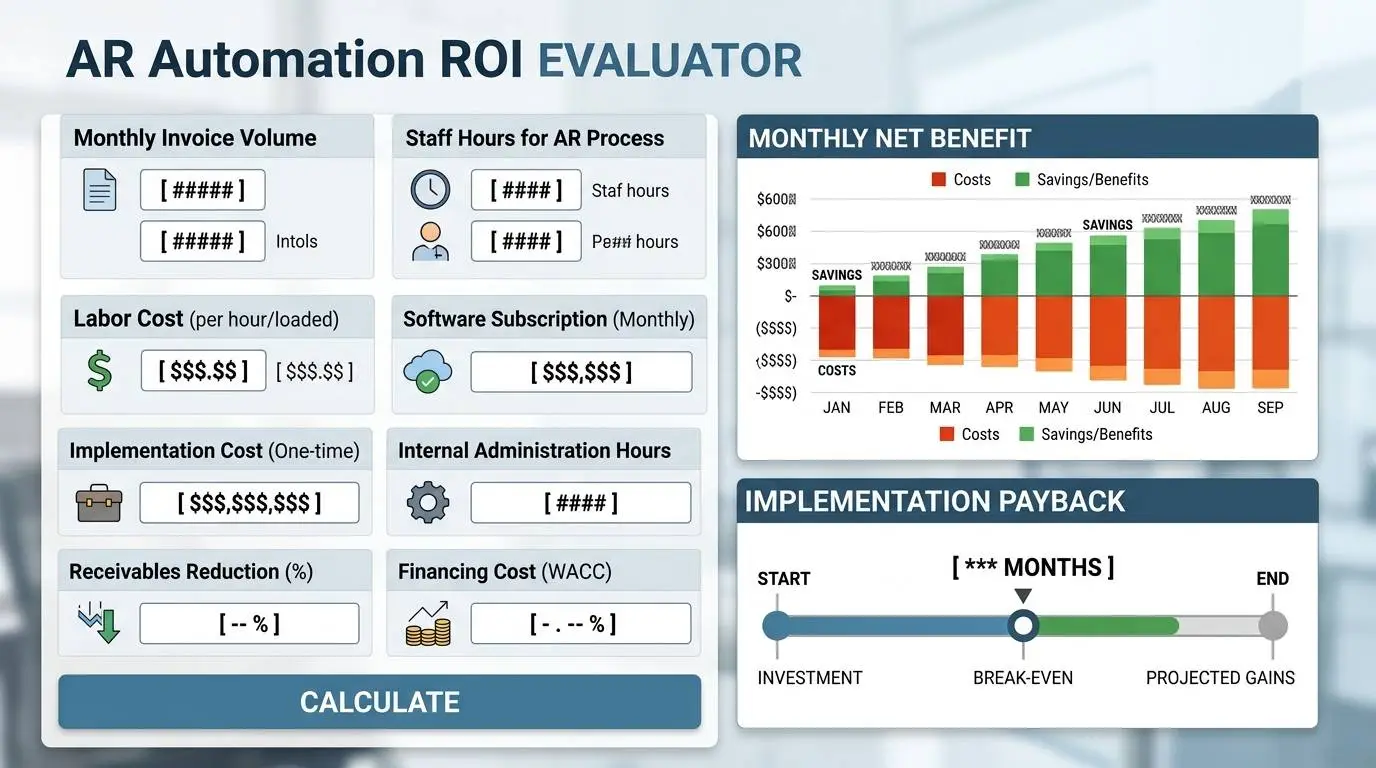
This example would support further evaluation, but not automatic approval.
The analysis could still fail if:
- The expected time savings are overstated
- Staff do not stop performing the old manual work
- The integration requires additional consulting
- The $60,000 reduction in receivables is not sustained
- Customers are late because of disputes or financial distress
- The company does not actually use a credit line
- Software pricing increases with users, invoice volume, or payment transactions
A credible ROI model should include a conservative case, an expected case, and a downside case.
Signs the Economics May Be Strong
AR automation is more likely to justify its cost when several of the following conditions exist:
- Invoice volume is high enough to create repeated administrative work
- The company sends similar reminders every week
- Multiple people participate in billing and collections
- Customer communications are scattered across inboxes
- Invoice delivery failures occur repeatedly
- Payment status is manually copied between systems
- Incoming payments require substantial matching work
- Management cannot distinguish disputes from ordinary late payments
- The company uses short-term borrowing while waiting for receivables
- Delays can be traced to fixable workflow failures
- The company can measure performance before and after implementation
AFP’s AR guidance emphasizes that every organization is different and that technology choices should be evaluated in the context of the company’s actual process and economics. That warning is particularly important for small teams, where an unnecessary platform may add more configuration and administration than it removes.
Who Should Not Buy Another AR Tool Yet?
Companies with very low invoice volume and little delinquency
A company sending eight straightforward invoices per month may need a checklist and calendar reminder, not another subscription.
Companies whose invoices are routinely wrong
The immediate project should be data and billing-quality improvement.
Companies with unresolved contract and scope problems
Collections automation will not clarify what the customer agreed to purchase.
Companies whose overdue balance is concentrated in one or two accounts
The issue may be credit concentration, negotiation, or relationship management rather than workflow scale.
Companies paid primarily before delivery
Businesses using retainers, deposits, cards, or prepayment may have limited traditional AR work.
Companies without an internal process owner
A vendor can configure software, but someone inside the company must own policies, exceptions, data quality, and performance.
Companies unwilling to standardize
If every salesperson, project manager, and customer receives a completely different process, automation will either be ignored or overloaded with exceptions.
A 30/60/90-Day Implementation Outline
Implementation should begin with the process, not the demo environment.
Days 1–30: Diagnose and standardize
Review the last 30–50 invoices, including paid, late, disputed, corrected, and written-off examples.
For each invoice, identify:
- Billing trigger
- Time from completed work to invoice
- Required approval or PO
- Whether the invoice was corrected
- Delivery channel
- First follow-up date
- Customer response
- Dispute status
- Payment date
- Time required to apply the payment
- Internal owner at each stage
Then define:
- Standard payment terms
- Required invoice fields
- Customer-contact ownership
- Reminder timing and tone
- Dispute categories
- Escalation authority
- Conditions for pausing reminders
- Service-suspension review
- Baseline metrics
The output of the first 30 days should be a working process specification—not a software shortlist.
Days 31–60: Configure and pilot
Select a pilot group with enough activity to test the workflow but limited enough to control risk.
A useful pilot may include:
- One customer segment
- One business unit
- One billing method
- A mix of on-time and regularly late accounts
- Several known exceptions
Configure only the essential workflow:
- Customer and invoice data
- Reminder sequence
- Task ownership
- Dispute status
- Payment-status updates
- Basic reporting
- Accounting integration
- User permissions
Review every automated communication during the pilot.
Do not launch an aggressive sequence across the entire customer base on the first day.
Days 61–90: Expand and measure
Compare results with the baseline:
- Invoice creation delay
- Delivery failures
- Percentage paid on time
- Average days delinquent
- Staff time spent on routine follow-up
- Correction rate
- Dispute rate
- Unapplied cash
- Customer complaints
- Number of accounts requiring manual intervention
Expand only after the team understands the exceptions.
A successful first 90 days may produce modest gains rather than a dramatic transformation. That is acceptable. Reliable incremental improvement is more valuable than a large forecast built on weak assumptions.
Questions to Answer Before Evaluating Software
A sales demonstration is more useful when the company can describe its workflow precisely.
Process
- What event authorizes billing?
- Who confirms that work is complete?
- Which invoices require customer approval, purchase orders, or timesheets?
- How long does it take to issue an invoice after work is completed?
- What are the five most common reasons invoices are corrected?
- How are disputes separated from ordinary late payments?
- Who can approve credits, payment plans, escalation, or service suspension?
Volume and economics
- How many invoices are issued each month?
- What is the average invoice value?
- How much staff time is spent on routine AR work?
- How much overdue value is concentrated in the largest customers?
- Does the company borrow while waiting for receivables?
- What measurable improvement would justify the total implementation cost?
Data and integration
- Where do customer terms and billing contacts live?
- Which system is the source of truth for invoice status?
- Must the AR system connect with accounting, CRM, project management, PSA, ERP, banking, or payment tools?
- How will duplicate, missing, or conflicting data be handled?
- Can all data be exported if the company changes systems?
Customer experience and control
- Which customers should receive automated communications?
- Which customers require human review?
- What immediately stops an automated sequence?
- Who monitors failed invoice delivery?
- What permissions should sales, operations, finance, and management receive?
- How will the company prevent a paid, disputed, or legally escalated invoice from receiving an inappropriate reminder?
A company that cannot answer these questions is not necessarily unready for improvement.
It is unready to evaluate software accurately.
Record when each invoice was created, corrected, delivered, followed up, disputed, paid, and reconciled. The repeated delays will show whether the next investment should be process improvement, automation, or both.
The Practical Conclusion
Accounts receivable automation is not a cure for every late payment.
It is most effective when a company already understands:
- What creates the right to invoice
- What information the customer needs
- Who owns each stage
- Which communication can be standardized
- Which exceptions need judgment
- What result must improve
- What that improvement is worth
The strongest automation projects do not begin with:
Which platform has the most features?
They begin with:
Why did the last 30 invoices take as long as they did to become usable cash?
Audit those invoices first.
The patterns will reveal whether the next investment should be software, better data, clearer contracts, stronger billing controls, more disciplined ownership—or a combination of all five.
This guide provides general business information, not accounting, financial, credit, collection, or legal advice. Survey findings are directional and may not represent every small business. Software capabilities, pricing, integrations, payment rules, and legal collection options can change; verify current details before acting.