
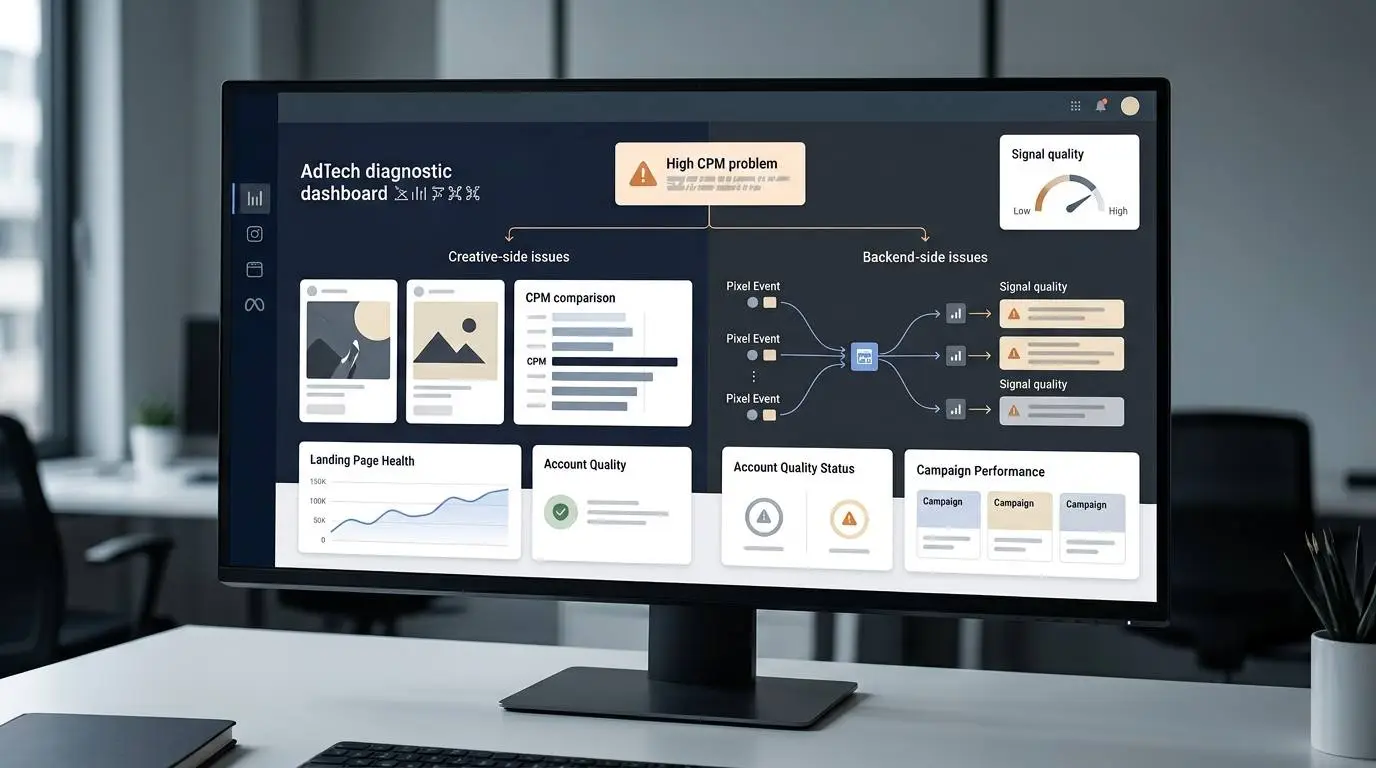
- High CPM is a symptom, not a complete diagnosis. Judge it together with CTR, CPC, conversion rate, CPA, ROAS, account quality and landing page performance.
- If CPM changes meaningfully across different creative concepts, the ad angle, hook, format or audience match may still be the main problem.
- If CPM stays unusually high across genuinely different creatives, inspect the shared system: ad account, Page, pixel or dataset, domain, landing page, policy history and tracking quality.
- Do not diagnose from tiny data. Compare several meaningful tests under similar conditions before deciding whether the issue is creative or backend.
- The best fix depends on the pattern: improve hooks and angles when CPM is uneven, but audit account health, signals and landing page trust when CPM is consistently high.
There is a frustrating moment every Facebook advertiser knows.
You launch a new campaign. The creative looks decent. The offer is not terrible. The targeting is not tiny. The budget starts spending.
Then you check Ads Manager.
The CPM is painful.
So you do what most advertisers do first: you change the creative.
New image. New hook. New video. New format. New avatar. New angle. New caption. New first frame.
The CPM stays high.
You test another batch.
Still high.
You test a different concept.
Still high.
At some point, it feels like the product is dead, the account is cursed or Facebook Ads just does not work anymore.
But there is a more useful way to look at it.
If your CPM is high, the creative might be the problem.
But if every meaningfully different creative gets almost the same expensive CPM, you may be trying to fix the wrong layer.
That is the real diagnosis.
A high CPM is not one disease. It is a symptom. And like any symptom, it can come from different causes.
Sometimes the problem is on the surface: the ad, the hook, the creative angle, the audience match or the way people react to the message.
Other times the problem is deeper: the ad account, Page, pixel, dataset, landing page, domain, policy history, tracking quality or the shared signals Meta sees before the ad ever gets a fair test.
If you treat a backend problem like a creative problem, you can burn through dozens of ads and learn almost nothing.
CPM Is a Symptom, Not a Diagnosis
CPM means cost per thousand impressions.
It tells you how much you are paying to show your ad 1,000 times.
A high CPM does not automatically mean the campaign is bad. In some markets, a higher CPM can still be profitable if the audience is valuable, the conversion rate is strong and the average order value supports the cost.
For example, a software company selling a $2,000 annual product may tolerate a much higher CPM than a store selling a $19 impulse-buy product.
That is why CPM should not be judged alone.
A smarter diagnosis looks at CPM together with:
- CTR
- CPC
- Landing page view rate
- Add-to-cart rate
- Lead quality
- Conversion rate
- CPA
- ROAS
- Frequency
- Ad relevance diagnostics
- Account quality
- Event match quality
- Policy history
- Landing page experience
But CPM is still useful because it tells you how expensive it is for your ad to enter the auction and win delivery.
When CPM becomes unusually high, it is a signal to slow down and ask:
“Is Meta charging more because this specific creative is weak, or because something shared underneath the campaign is making delivery expensive?”
That difference matters.
The Wrong Reflex: “Just Change the Creative”
Creative is important. In many accounts, it is the biggest lever.
A stronger hook can lower costs. A better first frame can improve video engagement. A clearer offer can increase click-through rate. A more believable testimonial can improve conversion rate. A new angle can help Meta find a better pocket of buyers.
So yes, testing creative is often the right move.
But it becomes a problem when advertisers use creative testing as the answer to everything.
If CPM is high, they change the image. If CPC is high, they change the hook. If ROAS drops, they change the video. If delivery is unstable, they change the format.
Sometimes that works.
But sometimes the creative is not the broken part.
Think of it like home internet.
If one phone is slow, the phone might be the problem. If every phone, laptop and TV in the house is slow, the problem is probably not each device. It is probably the router, modem or internet connection.
Facebook Ads can work the same way.
If one ad has high CPM and another ad is cheaper, creative may be the issue.
If every ad has a similarly high CPM, even when the concepts are truly different, the shared layer deserves attention.
The Two Main Types of High CPM Problems
Most high-CPM problems fall into two broad groups.
1. Surface-Level Problems
These are problems the audience can see directly.
They include:
- Weak creative
- Poor hook
- Bad first frame
- Confusing offer
- Low-quality image or video
- Mismatch between ad and audience
- Overly narrow targeting
- Audience saturation
- Low engagement
- Negative reactions
- Repetitive messaging
- Poor perceived quality
Surface-level problems usually show variation.
One creative is expensive. Another is less expensive. One hook gets ignored. Another gets clicks. One format struggles. Another earns engagement.
When the CPM moves meaningfully between creative concepts, the ad itself is giving Meta different signals.
That means creative work is probably still the right place to focus.
2. System-Level Problems
These are problems shared by many or all ads in the account.
They may include:
- Ad account history
- Page quality or trust signals
- Business asset restrictions
- Repeated policy issues
- Landing page problems
- Domain trust issues
- Pixel or dataset problems
- Poor event matching
- Incomplete conversion signals
- Suspicious offer patterns
- Risky claims
- Mismatched ad-to-page experience
- Payment, verification or account integrity issues
- A niche that Meta treats cautiously
System-level problems often show a different pattern.
The CPM is high across almost everything.
Different creatives. Different hooks. Different formats. Different avatars. Different concepts.
Same painful CPM range.
That does not prove the backend is the problem, but it is a strong reason to investigate the shared assets before making another batch of ads.

The Pattern That Matters Most
The key question is not:
“Is CPM high?”
The key question is:
“Is CPM high in the same way across meaningfully different tests?”
That phrase matters: meaningfully different.
Changing a background color is not a meaningful test. Changing a font is not a meaningful test. Cropping the same product image is not a meaningful test. Replacing one similar stock photo with another is not a meaningful test.
A meaningful creative test changes the reason someone would care.
For example:
- A product demo versus a customer testimonial
- A founder story versus a discount offer
- A problem-solution video versus a lifestyle image
- A UGC-style review versus a polished brand ad
- A comparison angle versus an educational angle
- A skeptical buyer angle versus an impulse offer angle
If those different concepts produce very different CPMs, Meta is reacting differently to the ads.
That points toward a surface-level creative or audience-message issue.
If those different concepts all come back with the same unusually high CPM, the problem may be sitting underneath the ads.
A Simple Diagnosis: Uneven CPM vs. Even CPM
Use this as a starting framework.
High CPM Is Uneven Across Creatives
Example pattern:
- Creative A: $38 CPM
- Creative B: $62 CPM
- Creative C: $44 CPM
- Creative D: $95 CPM
- Creative E: $41 CPM
This suggests Meta is responding differently to each creative.
The issue may be:
- Creative quality
- Hook strength
- Audience match
- Engagement rate
- First-frame performance
- Ad format
- Offer clarity
- Perceived relevance
In this case, keep testing creative. The system is showing you that some ads are more competitive than others.
Your job is to find out why.
High CPM Is Similar Across Creatives
Example pattern:
- Creative A: $104 CPM
- Creative B: $111 CPM
- Creative C: $108 CPM
- Creative D: $117 CPM
- Creative E: $106 CPM
This pattern is more suspicious.
If the creatives are genuinely different but the CPM range stays almost the same, the ads may be hitting the same hidden ceiling.
The issue may be:
- Account quality
- Page quality
- Pixel or dataset signal quality
- Landing page trust
- Policy-sensitive claims
- Domain problems
- Weak event matching
- Limited conversion history
- Business verification or payment issues
- Auction competition in a restricted niche
- A campaign structure that gives Meta poor learning signals
In this case, changing creative again may not solve the real problem.
You need to inspect the shared layer.
Do Not Diagnose Too Early
There is one important warning.
Do not make this call from tiny data.
A campaign that spent $12 today and got a high CPM is not enough evidence. A new ad with a few hundred impressions can swing wildly. Early delivery can be unstable. Certain audiences, placements and days of the week can change auction pressure.
Before deciding that the problem is backend, look for a pattern across enough tests.
A practical standard:
- Several meaningfully different creatives
- Same market and objective
- Similar budget conditions
- Enough impressions to compare
- At least a few days of delivery if possible
- No major edits every few hours
- No tiny ad sets that prevent learning
The goal is not to be perfect.
The goal is to avoid making a major diagnosis from noise.
Why the Backend Can Affect CPM
Many advertisers think only the ad itself affects CPM.
That is too simple.
Meta’s delivery system does not look only at the image or video. It also considers signals around the ad, the advertiser, the destination and the expected user experience.
If the ad looks risky, the landing page looks low quality, the business asset has issues, the account has restrictions or the conversion data is weak, delivery may become more expensive or limited.
That does not always show up as a clear “your account is broken” warning.
Sometimes the symptom is softer:
- Higher CPM
- Poor delivery
- Slower learning
- Limited spend
- Inconsistent approval
- Weak optimization
- Ads that technically run but never become competitive
This is why a clean creative test can still fail if the shared system is unhealthy.
Backend Problem 1: Account or Business Asset Quality
The first shared layer is the ad account and business assets.
That includes:
- Ad account
- Business Manager
- Facebook Page
- Instagram account
- Domain
- User account access
- Payment setup
- Business verification
- Past ad rejections
- Policy history
If Meta sees repeated issues around the advertiser, that can affect delivery, review and restrictions.
This does not mean every high CPM account is restricted. But if all ads are expensive, the account layer should be checked.
Look for:
- Recent rejected ads
- Assets under review
- Account Quality warnings
- Payment issues
- Verification requests
- Disabled or restricted assets
- Page transparency problems
- Sudden delivery limitations
- Repeated edits after rejection
- Ads that pass review but barely deliver
If you find a real restriction, do not try to bypass it with throwaway assets or misleading workarounds.
Fix the policy issue, edit the ad or landing page to comply, and request a review if you believe Meta made a mistake.
Trying to evade enforcement can create bigger problems later.
Backend Problem 2: Page and Brand Trust Signals
The Facebook Page or Instagram profile is not just decoration.
For many users, the Page is part of the trust layer.
If someone sees an ad from a Page with no history, low engagement, unclear branding, poor comments, inconsistent content or suspicious-looking posts, the ad may feel less trustworthy.
This can affect engagement and perceived quality.
For small businesses and affiliate-style sites, this matters a lot.
A Page that exists only to run ads may struggle more than a Page with:
- Clear branding
- Real posts
- Consistent topic
- Completed profile information
- Matching website domain
- Helpful content
- Real engagement
- Clean comments
- No spammy claims
- No bait-style posts
This does not mean you need a huge Page before running ads.
But if your CPM is high across every creative, the Page is part of the shared system worth reviewing.
Backend Problem 3: Pixel or Dataset Signal Quality
The pixel or dataset is another shared layer.
If Meta is optimizing from poor data, the campaign may struggle even when the creative is decent.
Common issues include:
- Purchase events missing
- Duplicate events not deduplicated correctly
- Wrong event firing
- Events firing on page load instead of real actions
- Low event match quality
- Browser-only tracking with weak signal
- Conversions API not configured
- Too few conversion events
- Lead events that include many low-quality leads
- Event parameters missing value, currency or content details
- The same pixel used across unrelated offers or messy traffic sources
Advertisers often describe this as a “dirty pixel,” but that phrase can be too vague.
A clearer way to say it:
The dataset may be giving Meta confusing, incomplete or low-quality learning signals.
If Meta cannot match events well or understand which actions matter, it may struggle to find the right people efficiently.
This does not always show up directly as CPM.
It may show up as higher CPM, higher CPA, poor learning quality, weak conversion rate or unstable delivery.

Backend Problem 4: Landing Page Experience
The landing page is part of the ad experience.
If the ad promises one thing and the page delivers something else, users bounce. If the page loads slowly, looks untrustworthy or makes aggressive claims, performance can suffer.
This matters especially in competitive U.S. markets where users are flooded with ads every day.
Landing page issues may include:
- Slow mobile load speed
- Too many pop-ups
- Low-quality design
- Weak brand trust
- No clear product explanation
- Claims that feel exaggerated
- Before-and-after claims in sensitive categories
- Missing contact or policy information
- Mismatch between ad promise and landing page
- Checkout or form friction
- Poor mobile experience
- Suspicious pricing or offer framing
A creative can get the click.
The page has to earn the next action.
If every creative sends traffic to the same weak page, the backend issue may be the destination.
Backend Problem 5: Risky Claims or Policy-Sensitive Categories
Some niches are more sensitive than others.
Health. Weight loss. Beauty. Finance. Insurance. Supplements. Crypto. Dating. Employment. Housing. Personal improvement. Medical-adjacent products. Before-and-after style claims.
In these categories, small wording choices can create risk.
Even if an ad is not rejected, performance may still suffer if the system reads the ad or landing page as low quality, sensational, misleading or too personal.
Examples of risky patterns:
- “Are you tired of your body?”
- “This fixes your anxiety fast”
- “Doctors hate this”
- “Lose weight without effort”
- “Get rich with this method”
- “You look older because…”
- “This one trick changes everything”
- Overly aggressive before-and-after visuals
- Claims that imply guaranteed results
- Copy that calls out personal attributes too directly
A policy-sensitive niche can push CPM higher because the system is more cautious and the auction environment is more competitive.
In these cases, creative testing still matters, but compliance and trust matter just as much.
Backend Problem 6: Offer-Audience Mismatch
Sometimes CPM is high because the market is expensive and the offer is weak for that audience.
This is not exactly a creative problem or a technical backend problem.
It is a positioning problem.
For example:
- You are selling a low-margin product to an expensive U.S. audience.
- Your offer looks similar to many competitors.
- Your price is too high for cold traffic.
- The landing page does not explain why the product is different.
- The product requires trust, but the ad asks for a purchase too quickly.
- The audience needs education, but the ad sells too aggressively.
- The market is saturated with similar ads.
Changing creative may help, but only if the new creative changes the positioning.
If the product, promise and page all feel the same, Meta may keep seeing the offer as hard to deliver profitably.
How to Diagnose Before Making More Creatives
Before producing another batch of ads, run a structured audit.
Step 1: Compare CPM Across Truly Different Concepts
Do not compare five versions of the same ad.
Compare concept-level differences.
For example:
- Demo
- Testimonial
- Problem-solution
- Founder story
- Educational angle
- Offer angle
- UGC review
- Comparison ad
If CPM varies widely, creative is still a major lever.
If CPM stays unusually high across all concepts, investigate the shared layer.
Step 2: Check Ad Relevance Diagnostics
Look at:
- Quality ranking
- Engagement rate ranking
- Conversion rate ranking
These are not perfect, and they may not always show enough data. But they can help separate quality, engagement and conversion expectation problems.
If one creative has poor engagement ranking and another does not, creative likely matters.
If everything is below average or the account never gets enough useful data, the issue may be broader.
Step 3: Review Account Quality
Check whether there are warnings, restrictions, rejected ads or assets under review.
Look at:
- Ad account status
- Business account status
- Page status
- User access issues
- Verification requests
- Policy history
- Repeated rejection patterns
If there is a restriction, fix the root cause.
Do not try to hide the same policy problem inside a new ad.
Step 4: Inspect Events Manager
Check whether your key events are firing correctly.
Look for:
- Purchase event accuracy
- Lead event accuracy
- Deduplication
- Event match quality
- Conversions API setup
- Missing parameters
- Event volume
- Event source quality
- Strange spikes or drops
- Events firing at the wrong moment
If the dataset is messy, creative testing may not teach Meta the right lesson.
Step 5: Review the Landing Page Like a User
Open the page on mobile.
Ask:
- Does it load quickly?
- Is the promise clear in the first screen?
- Does the page match the ad?
- Does the brand look real?
- Are claims believable?
- Is pricing clear?
- Is the checkout or form simple?
- Is there contact information?
- Are policies visible?
- Would a skeptical U.S. buyer trust this?
If the answer is no, the ad may not be the first thing to fix.
Step 6: Look for Niche and Auction Pressure
Sometimes CPM is high because the market is expensive.
This is common in U.S. audiences for:
- Finance
- Insurance
- SaaS
- Legal
- Health
- Beauty
- Supplements
- B2B software
- High-value leads
- Competitive e-commerce categories
If the CPM is high but CPA and ROAS are healthy, do not panic.
If CPM is high and every downstream metric is weak, the diagnosis becomes more serious.

What to Fix If It Is a Creative Problem
If CPM is uneven across creatives, keep testing the surface layer.
Focus on:
Stronger Hooks
The first line or first frame should give people a reason to care immediately.
Weak:
“Introducing our new skincare solution.”
Better:
“Still buying products that feel good for two days and then do nothing?”
Better Audience Matching
The same product may need different angles for different buyers.
A busy parent, college student, office worker and small business owner may all buy productivity software for different reasons.
Creative should reflect those reasons.
Stronger Proof
Use specific proof where appropriate:
- Demonstrations
- Reviews
- Use cases
- Before-and-after process, if compliant
- Founder explanation
- Customer story
- Product comparison
- Real-world example
Cleaner Visuals
Bad design can make an ad look low-trust before people read a word.
The visual should communicate:
- What it is
- Who it is for
- Why it matters
- What changes after using it
More Distinct Angles
Do not make ten versions of the same ad.
Test ten reasons someone might care.
What to Fix If It Is a Backend Problem
If CPM is consistently high across every meaningful creative test, stop producing new ads for a moment.
Audit the shared system.
Account and Page
- Check Account Quality
- Review rejected ads
- Clean up misleading copy
- Complete Page information
- Remove spammy posts
- Improve brand consistency
- Review comments and trust signals
- Fix verification or payment issues
Pixel and Tracking
- Check Events Manager
- Confirm events fire correctly
- Improve event match quality
- Set up Conversions API if appropriate
- Make sure key parameters are passed
- Remove duplicate or incorrect events
- Separate unrelated offers if needed
- Track lead quality, not only lead volume
Landing Page
- Improve mobile speed
- Match the ad promise
- Reduce exaggerated claims
- Add trust signals
- Clarify pricing
- Make the next action obvious
- Remove confusing pop-ups
- Improve checkout or form flow
Offer and Positioning
- Clarify the buyer
- Reduce friction for cold traffic
- Add education before asking for purchase
- Improve proof
- Test a different offer structure
- Make the value easier to understand
Compliance
- Avoid misleading claims
- Avoid personal attribute callouts
- Avoid exaggerated before-and-after claims
- Avoid fake urgency
- Avoid deceptive pricing
- Review sensitive category rules
- Request review if you believe an asset was restricted by mistake
This is slower than making another creative.
But if the backend is the issue, it is the work that actually matters.
A Practical Decision Tree
Use this simple decision tree when CPM is high.
Question 1: Is CPM high on one creative or every creative?
If one creative is high and others are normal, fix the creative.
If every creative is high, continue.
Question 2: Were the creatives meaningfully different?
If no, test real concept differences first.
If yes, continue.
Question 3: Are downstream metrics still strong?
If CPM is high but CPA or ROAS is good, do not overreact.
If CPM is high and CTR, CPC, conversion rate and CPA are all poor, continue.
Question 4: Are there account, Page or policy issues?
If yes, fix those first.
If no, continue.
Question 5: Are pixel events and conversion signals clean?
If no, fix tracking.
If yes, continue.
Question 6: Does the landing page match the ad and build trust?
If no, fix the page.
If yes, continue.
Question 7: Is the niche simply expensive?
If yes, the answer may be better unit economics, stronger conversion rate or better offer positioning, not lower CPM alone.
This process prevents emotional media buying.
You are not guessing. You are isolating the layer.
The Biggest Mistake: Testing Randomly
Random testing creates random conclusions.
A bad testing process looks like this:
Launch ad. CPM high. Panic. Change creative. CPM still high. Change audience. Change budget. Duplicate campaign. Change objective. Change landing page. Turn things off. Start over.
After two weeks, you have data everywhere and insight nowhere.
A better process isolates variables.
Test creative while holding the account, audience, objective and landing page stable.
Test landing page while holding the creative and traffic source stable.
Test tracking after verifying event firing and attribution.
Test offer structure separately from creative style.
Good diagnosis requires clean comparison.
If everything changes at once, nothing is learned.
Why This Matters More in 2026
Meta Ads are more automated than they used to be.
With broader targeting, Advantage+ systems and AI-assisted delivery, advertisers are giving Meta more room to decide who should see an ad.
That makes signal quality more important.
If the system receives clear signals, it can learn faster.
If the system receives confusing signals, weak events, risky claims or low-trust landing pages, automation may simply optimize poorly at scale.
In the old playbook, advertisers tried to fix performance by controlling more settings.
In the newer playbook, advertisers often need to improve the inputs:
- Creative quality
- Conversion data
- Landing page trust
- Account health
- Offer clarity
- Customer feedback
- Event quality
That is why high CPM diagnosis matters.
The best advertisers are not just creative testers.
They are system diagnosticians.
Final Thoughts
High CPM does not always mean your creative is bad.
Sometimes it does. Sometimes the hook is weak. Sometimes the visual does not stop the scroll. Sometimes the audience does not care. Sometimes the offer is unclear.
But if you have tested meaningfully different creatives and every one of them comes back with the same unusually high CPM, pause before making another batch.
The problem may not be the ad.
It may be the shared system underneath the ad: the account, Page, pixel, dataset, landing page, domain, policy signals, tracking quality or offer trust.
The smartest move is not always to create more.
Sometimes the smartest move is to diagnose better.
Because if the router is broken, restarting every phone in the house will not fix the internet.
And if the backend is the problem, changing creative forever will not fix your CPM.
This article is for educational purposes only. Meta Ads performance can vary by market, auction competition, industry, creative quality, tracking setup, landing page experience and account history. Advertisers should follow Meta’s current advertising standards and avoid attempts to evade platform enforcement.