
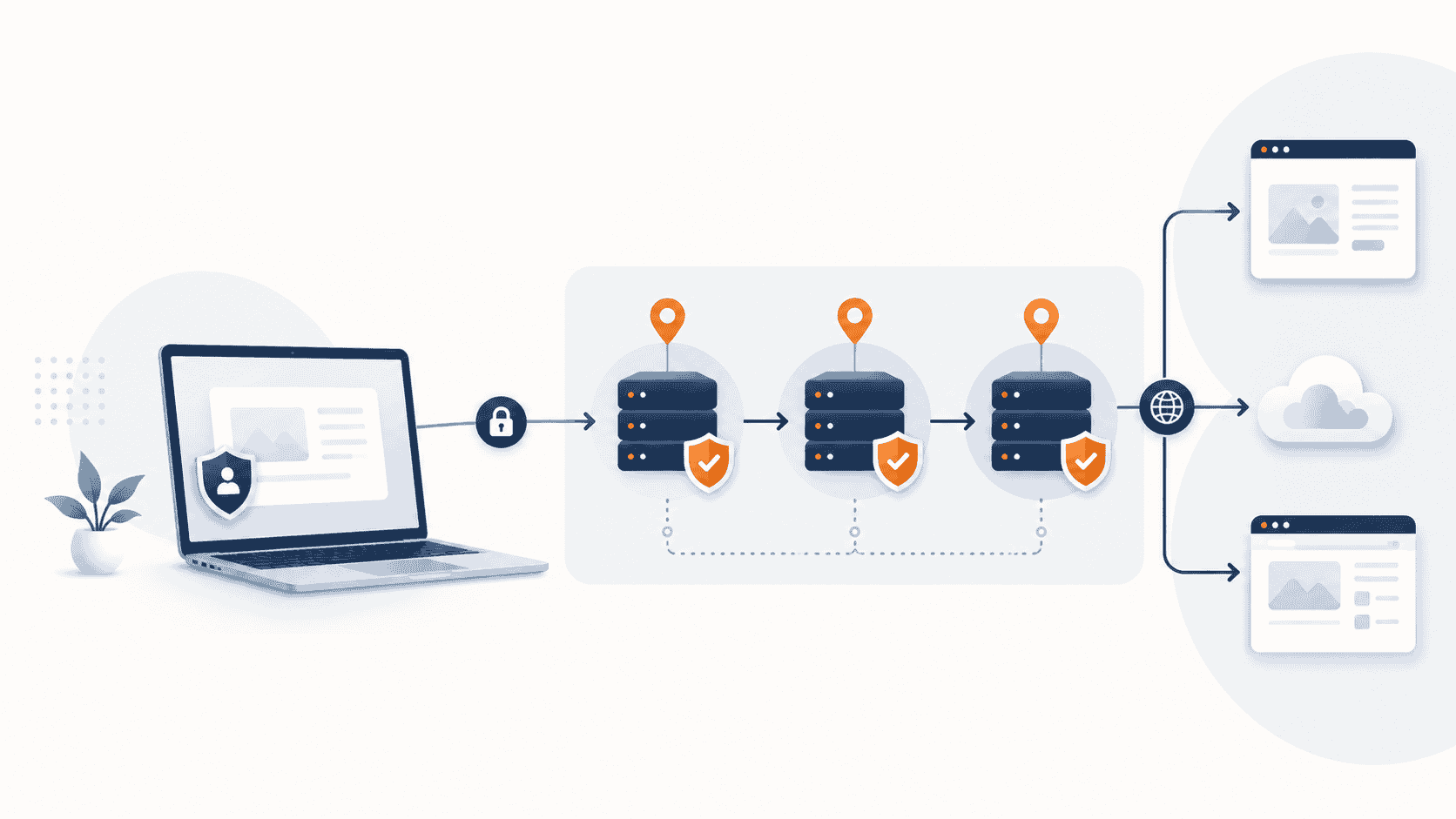
- A proxy server works as a middle layer between your device and the websites, apps or services you access.
- Websites usually see the proxy’s IP address rather than your direct connection.
- Datacenter, residential, ISP and mobile proxies are designed for different levels of speed, cost, stability and location realism.
- A proxy is not the same as a VPN. VPNs usually encrypt most or all device traffic, while proxies typically route specific app, browser or request-level traffic.
- The best proxy type depends on your use case, budget, location needs and risk level.
Every time you visit a website, your device leaves behind a digital address known as an IP address. That address can reveal general information about your location, internet provider and device connection.
For most people, that may not seem like a big deal. But for businesses, marketers, developers, researchers and privacy-conscious users, controlling how a connection appears online can be important.
That is where proxy servers come in.
A proxy server works as a middle layer between your device and the websites or apps you use. Instead of connecting directly to a website, your request first goes through the proxy. The website then sees the proxy’s IP address rather than your original connection.
Used properly, proxies can help with privacy, security testing, market research, ad verification, web development, brand protection and access to localized web experiences.
But not all proxies are the same. Some are fast and cheap. Some are more reliable for business use. Some are designed for developers. Others are better suited for teams that need location-specific browsing.
This guide explains what proxy servers are, how they work and how to choose the right type.
What is a proxy server?
A proxy server is an intermediary server that sits between your device and the internet.
When you open a website, your device usually sends a request directly to that website. With a proxy, your request goes to the proxy server first. The proxy then forwards the request to the destination website and sends the response back to you.
In simple terms:
Your device → Proxy server → Website
The website sees the proxy connection, not your direct connection.
This can help users and businesses manage privacy, control traffic, test websites from different locations or separate different online activities.
Proxy vs. VPN: what’s the difference?
People often confuse proxies with VPNs because both can route traffic through another server.
The difference is that a VPN usually encrypts the entire internet connection from your device, while a proxy typically works at the app, browser or request level.
A VPN is often better for general personal privacy, especially on public Wi-Fi. A proxy is often better for specific tasks such as browser sessions, web testing, automation, market research or managing location-based access.
Here is the simple version:
| Feature | Proxy | VPN |
|---|---|---|
| Main purpose | Routes specific traffic through another IP | Encrypts most or all device traffic |
| Best for | Browsers, apps, automation, research and testing | Personal privacy, public Wi-Fi and everyday browsing |
| Speed | Often faster depending on type | Can be slower due to encryption |
| Setup | Can be app-based or browser-based | Usually device-wide |
| Business use | Strong for data, testing and workflow separation | Strong for secure remote access |
If you just want safer browsing on airport or café Wi-Fi, a VPN may be the better fit. If you need more control over IP type, location, rotation or browser sessions, a proxy may be more useful.
The main types of proxies
Choosing the right proxy depends on your use case. The four most common types are datacenter, residential, ISP and mobile proxies.
Datacenter proxies
Datacenter proxies use IP addresses from cloud servers or data centers. They are usually fast, affordable and easy to scale.
They are commonly used for:
- Website testing
- Basic market research
- SEO checks
- Speed-focused browsing
- Developer workflows
- Non-sensitive automation
The biggest advantage is cost. Datacenter proxies are usually cheaper than residential or mobile proxies.
The downside is that some websites may identify datacenter IPs more easily because they do not come from regular home internet connections.
Best for: users who need speed and affordability.
Not ideal for: tasks that require a highly natural-looking consumer connection.
Residential proxies
Residential proxies use IP addresses associated with real home internet connections. Because they appear closer to regular consumer traffic, they are often more reliable for location-based testing and business research.
They are commonly used for:
- Localized website testing
- Price comparison research
- Ad verification
- Brand protection
- Public web data collection
- Checking how websites appear in different cities or countries
Residential proxies are usually more expensive than datacenter proxies, but they can be better for tasks that require stronger location accuracy and fewer access issues.
Best for: businesses that need realistic browsing conditions.
Not ideal for: users who only need cheap, high-speed traffic.
ISP proxies
ISP proxies combine some of the benefits of datacenter and residential proxies. They are often hosted on servers but use IPs registered through internet service providers.
This can make them faster and more stable than many residential proxies while still appearing more trustworthy than standard datacenter IPs.
They are commonly used for:
- Long sessions
- Account-based business workflows
- Stable location testing
- E-commerce monitoring
- Market research
- Web quality assurance
ISP proxies are often priced higher than datacenter proxies, but they can be a good middle ground for users who need both speed and credibility.
Best for: users who want stable sessions and stronger IP quality.
Not ideal for: users on a very tight budget.
Mobile proxies
Mobile proxies use IP addresses from mobile carriers. They route traffic through mobile networks such as 4G or 5G.
They are usually the most expensive type of proxy but can be valuable when testing mobile-first platforms, mobile ads or app experiences.
They are commonly used for:
- Mobile app testing
- Mobile ad verification
- Local mobile search testing
- Social media research
- Mobile user experience checks
Mobile proxies can be powerful, but they are not necessary for most beginners.
Best for: mobile-focused marketers, app developers and advanced testing teams.
Not ideal for: basic browsing or low-budget projects.
Common legitimate uses for proxies
Proxy servers are not just for privacy enthusiasts. Many companies use them as part of normal business operations.
Market research
Businesses may use proxies to view publicly available information from different locations. This can help them understand pricing, availability, search results and customer experience across markets.
For example, a retailer might want to see how its website appears to users in New York, Los Angeles and Dallas.
Ad verification
Advertisers need to confirm that their ads are appearing correctly, in the right regions and on the right websites. Proxies can help marketing teams check campaigns from different geographic locations.
This is especially useful for brands running national or international campaigns.
SEO and search testing
Search results can vary by location. A business in Chicago may not see the same results as a user in Miami.
Proxies can help SEO teams review localized search results, monitor ranking differences and understand how competitors appear in different markets.
Web development and QA testing
Developers and QA teams may use proxies to test how a website behaves in different regions, networks or device environments.
This is useful for checking:
- Localized pricing
- Language settings
- Redirects
- App performance
- Regional landing pages
- Access rules
Brand protection
Companies may use proxies to monitor unauthorized sellers, fake product listings, copied content or misleading ads.
For brands that sell online, this can help detect problems earlier.
Privacy and workflow separation
Some users use proxies to separate personal browsing, business research and testing environments.
This does not make someone anonymous on the internet, but it can add a useful layer of separation when used correctly.
What proxies should not be used for
A proxy is a tool. Like any tool, it can be used responsibly or irresponsibly.
You should not use proxies to:
- Break laws
- Commit fraud
- Spam websites or social platforms
- Bypass account bans
- Steal data
- Access private systems without permission
- Ignore website terms or robots.txt rules
- Misrepresent yourself in financial, legal or identity-related situations
If you are using proxies for business research, keep your activity ethical, transparent where required and compliant with the websites and services you access.
A good proxy provider should also have clear acceptable-use policies, responsible sourcing and customer verification for sensitive use cases.
How to choose the right proxy provider
Before paying for a proxy service, look at these factors.
Proxy type
Start with your use case.
If you need speed and low cost, datacenter proxies may be enough. If you need more realistic browsing conditions, residential or ISP proxies may be better. If you need mobile app or mobile ad testing, mobile proxies may be worth considering.
Location coverage
Check whether the provider offers the countries, states or cities you need.
For a U.S.-focused business, state-level or city-level targeting can be useful. For global research, you may need broader country coverage.
Speed and uptime
A cheap proxy is not useful if it disconnects often or loads pages slowly.
Look for providers that publish performance information, offer testing options or provide a trial.
Rotation options
Some tasks require rotating IPs. Others require sticky sessions, where the same IP remains active for a period of time.
For example:
- Rotating proxies are useful for broad public data collection.
- Sticky sessions are useful for login-based workflows and longer browsing sessions.
Dashboard and ease of use
Beginners should look for a clean dashboard, simple setup guides and browser or app integration.
Advanced users may care more about API access, proxy lists, authentication methods and traffic controls.
Pricing model
Proxy pricing can be based on:
- Bandwidth usage
- Number of IPs
- Monthly subscription
- Pay-as-you-go traffic
- Dedicated IP rental
For beginners, pay-as-you-go plans can be safer because they allow you to test before committing.
Support and documentation
Good documentation matters.
Look for setup guides for Chrome, Firefox, Windows, macOS, mobile devices, API tools and popular proxy managers.
If you are using proxies for business, responsive support can save a lot of time.
Compliance and ethical sourcing
This is one of the most important factors.
A reliable proxy provider should explain how its network is sourced, what use cases are allowed and what activities are prohibited.
Avoid providers that make unrealistic promises or encourage abusive behavior.
Which proxy type should you choose?
Here is a simple decision guide:
| Use case | Best proxy type |
|---|---|
| Basic testing and low-cost browsing | Datacenter proxy |
| Localized research and ad checks | Residential proxy |
| Stable business sessions | ISP proxy |
| Mobile app or mobile ad testing | Mobile proxy |
| Public data collection at scale | Residential or datacenter, depending on target sites |
| SEO location checks | Residential, ISP or datacenter |
| General public Wi-Fi privacy | VPN instead of proxy |
For most beginners, the best starting point is either a datacenter proxy or a small residential proxy plan.
If your work depends on stable sessions, accurate U.S. locations or business-grade reliability, ISP proxies may be worth the higher price.
Red flags to avoid
Not every proxy provider is trustworthy.
Be careful if a provider:
- Offers prices that seem unrealistically cheap
- Does not explain where its IPs come from
- Has no acceptable-use policy
- Promises “undetectable” access
- Encourages spam or account abuse
- Has poor documentation
- Does not offer support
- Has unclear refund terms
- Does not disclose bandwidth limits
A good proxy service should make your workflow more reliable, not put your business at risk.
Final thoughts
Proxy servers can be useful tools for privacy, testing, research and business intelligence. But the right choice depends on what you are trying to do.
Datacenter proxies are fast and affordable. Residential proxies offer more realistic browsing conditions. ISP proxies provide stable, high-quality sessions. Mobile proxies are best for mobile-specific testing.
If you are new to proxies, do not start with the most expensive plan. Start small, test your use case and upgrade only when you understand what type of IP, location and session control you actually need.
The best proxy is not always the biggest or most expensive one. It is the one that matches your workflow, budget and risk level.
Compare beginner-friendly proxy plans and choose the option that fits your use case, budget and location needs.
Editor’s note
This guide is for educational purposes only. Always use proxies legally, ethically and in compliance with the terms of the websites and services you access.